
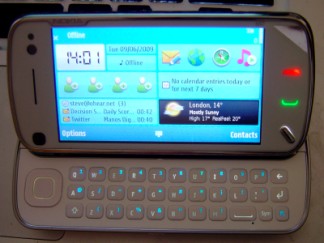
 Having only had around 10 minutes hands-on time with Nokia’s new flagship mobile phone, the N97, at a recent press event in London in which my initial impressions were largely positive, I was really keen to source a loan unit for some quality time with the device. Thanks to Nokia’s PR reps in the UK, I did just that, taking delivery of an N97 on Friday. There is of course a world of difference between living with a phone for any meaningful length of time and having a quick play at a press event or trade show. And after 3 days of ‘real world’ use, I’ll offer up the first mea culpa: the keyboard isn’t nearly as good as I’d first reported (see below). Read on for a more in-depth review of the Nokia N97…
The Nokia N97 looks great + There’s no doubt that Nokia’s design team have upped their game in the hardware looks department. Borrowing from the design cues we first saw in last year’s business focused E-series range — the E71, for example — gone is the bulky all-in-one heap of black plastic as epitomized by the N96, with the N97 featuring a sleek metal trim around its otherwise curvy but subtle plastic casing, with most of the physical buttons also utilizing metal. It’s not only solid in build with no obvious creaking but it looks classy too. And while the N97 isn’t the thinnest of devices, it’s not too chunky by any means, especially when you factor the slide-out QWERTY keyboard.
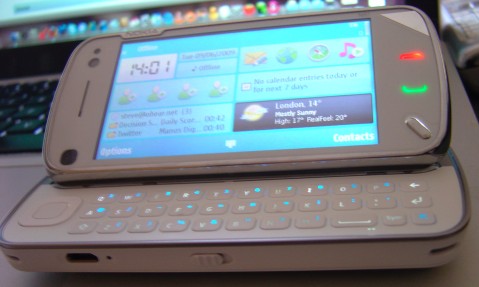
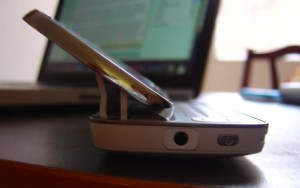 The Big Reveal + The hardware engineering that has gone into the slide-out keyboard is really impressive and provides an almost Steve Jobs-like Big Reveal when showing off the device. When the otherwise completely hidden QWERTY keyboard slides out, it’s that well concealed, the N97’s screen tilts up for a 35 degree viewing angle. Boom. This enables the device to sit perfectly on a surface when viewing videos, surfing the web or reading emails. No need for any kind of kick stand and it’s weighted as such that it also feels comfortable when held in both hands.
The resistive touch screen – It was one of my criticisms of the Nokia XpressMusic 5800 and it also applies to the N97. I’d much prefer a capacitive touch screen as found in the iPhone and other touch screen phones from Samsung and LG, for example. Rather than relying on pressure to register input, a capacitive screen uses the natural electric discharges from a person’s finger. The result is that they feel a lot more responsive, supported by good software of course. This is particularly noticeable when trying to swipe through photos or scroll through web pages where you don’t naturally push down on the screen but rather slide a finger across the surface. Having said that, as far as resistive screens go, the N97’s is one of the most responsive I’ve used and is certainly an improvement over the XpressMusic 5800.
The QWERTY keyboard – On paper, the inclusion of a QWERTY, a first for an N-series device, is a major plus. I’m a QWERTY kind of guy. However, after prolonged use, as impressive as the slide-out mechanism is, the keyboard itself isn’t as good as it could be. The keys are nicely spaced out but are far too flat and don’t provide nearly enough travel. I much prefer the E71’s keyboard and after a back to back test, even the E75 performs better (despite the keys being flatter than the N97, they have a much more pronounced click).
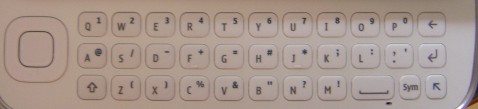
N97's QWERTY keyboard
The build quality of the keyboard on my review model also has to come into question. Not all the keys have the same amount of travel, with the middle and bottom rows performing better than the top row. Individual keys also vary. Possibly related, the back lighting of each key isn’t even either. The key markings are a poor choice of colour on the white version of the N97 too (I can’t speak of the black model) as in certain lighting conditions they are hard, though not impossible, to make out. The space bar’s odd positioning, however, I didn’t find to be much of an issue and like any phone’s QWERTY keyboard, just takes a bit of getting used to.
Overall, the QWERTY is better than not having one at all but coming from a Nokia E71, Blackberry, Palm Treo or some of HTC’s Windows Mobile devices, is a bit of a let down.
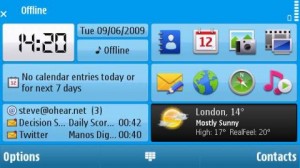
N97 home screen widgets
Home screen widgets + With the introduction of widgets, the N97’s home screen is my favorite of all the smartphones I’ve used. Available widgets fall into two camps: those that pull in data from the web, such as the Facebook widget, email or AcuWeather, and traditional home screen widgets that display locally stored data, such as appointments from the phone’s calendar app or shortcuts to your favorite applications. Best of all is it’s completely customizable. You can rearrange how your selected widgets are placed on the home screen (within a predefined grid that keeps things tidy), as well as decide which of the available widgets deserve space on the home screen in the first place. Any third-party app can offer, in theory, an associated widget, so we should see the list of available widgets grow in the future. Obviously, widgets that continually pull in data from the web could pose a problem for those without an unlimited data plan, as well as drain the phone’s battery, so Nokia have provided the option to take all widgets off-line when required. Swipe your finger across the widget home screen as a whole and the phone switches to a much plainer, alternative home screen devoid of any personal data.
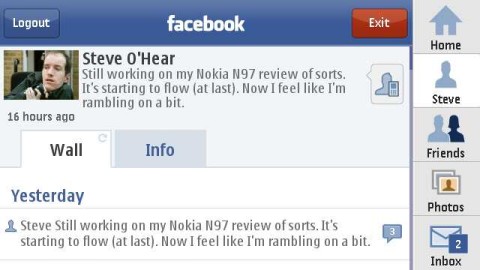 Facebook app + The inclusion of a Facebook app is very welcome and it’s a pretty decent one too. It’s built using web standards utilizing Nokia’s Web Runtime (WRT) widget platform and mimics much of the functionality of other Facebook mobile clients, such as the iPhone’s. It’s not the speediest of apps, however, and perhaps because it’s a widget it doesn’t appear to cache content so that it needs to reload everything from scratch each time you shut down and relaunch the app. On a more positive note, the ability to upload photos taken with the N97’s camera directly to Facebook works really well, including the option to target a particular Facebook ‘album’ and to add tags etc., and it’s also possible to add an appointment to the N97’s calendar based on a Facebook event, although changes aren’t synced automatically between the two.
 Third party apps – Considering the maturity of Symbian S60, it seems counter intuitive to discover that there aren’t very many third-party apps available for the Nokia N97 – yet. That’s because the device uses the new touch screen version of the OS, S60 5th edition, which only debuted recently on the 5800 XpressMusic. Many S60 third-party apps have yet to be rewritten for a touchscreen interface. Missing in action, for example, is YouTube’s newly released S60 client, instead the N97 features a short cut to the mobile web version of the site, along with the Skyfire web browser, another favorite app of mine. Third-party support should obviously improve going forward, and Nokia are certainly pitching the N97 as a device as in it for the long term with regular firmware updates and other software improvements promised, which should help to install confidence within the wider developer community that it’s worth committing to the platform.
Ovi Store + The Ovi Store, Nokia’s on-deck app store, may not have got off to the best of starts but it’s a valuable addition to the N97, especially since it comes pre-installed, making it a lot easier for users to discover and install third-party applications. The Ovi Store client on the N97 also feels a lot snappier than the version I installed on the E71.
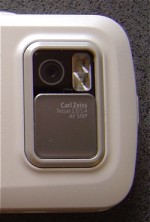 The 5 megapixel camera + The N97’s camera won’t grab any headlines for megapixels alone – just 5 – but it’s a very capable offering nonetheless. As is standard in Nokia N-series devices, the optics are Carl Zeiss branded and not that this alone translates into nice looking photographs, I’ve been pretty impressed. Photos look sharp with vivid but natural looking colors, and mechanically, the shutter key isn’t too rigid, something that I had a slight issue with on the Nokia N85. The sliding and sturdy lens cover should also get a mention. One complaint that many will have though, especially those coming from the legendary N95 is the lack of a Xenon flash. Instead, Nokia provides a dual LED, which isn’t nearly as bright but has the advantage of using less power and can double up more efficiently as a video light. On that note, the N97 shoots decent enough video, better than most camera phones, offering so-called DVD quality (it’s nowhere near that in reality) at 30 frames-per-second, certainly good enough for YouTube etc. There’s also the option to shoot in sudo widescreen (i.e. zoomed in to fill a 16:9 screen), which is switched on by default. Interestingly, Nokia appears to be bundling a Qik client with the N97 to enable live streaming of video to the third-party video service.
Media playback + Along with excellent media production features, the N97 makes a very capable media player. Viewing video benefits greatly from the 3.5 inch 640×360 widescreen, along with the 35 degree viewing angle when the QWERTY keyboard is visible, and the fairly loud built-in stereo speakers. A whole bunch of video and audio codecs are supported, including Windows DRM so that paid-for content from many third-parties can be supported e.g. Amazon VOD in the U.S. On the music side, Nokia has bundled its own download store and podcast client, and there’s also a built-in FM tuner with RDS and an FM transmitter so that you can broadcast your music collection to a car stereo, for example. Nokia have also tidied up the way it presents all of this functionality. Gone is the generic ‘Gallery’ app that used to duplicate access to the music and sometimes video players, and instead there are just three clearly sign posted and discrete apps: photos, music, and video.
32GB of internal storage + With all of that media production and playback goodness, it’s good to know that storage won’t be a problem. On top of the whopping 32GB of built-in flash memory, you can add even more via the microSD card slot, potentially bringing the total to 48GB and 64GB sometime in the near future. I’m still getting a smile everytime I install an app on the N97 and see how much free storage is left!
No DLNA support – This is probably seen as a niche feature, not helped by Nokia’s poor marketing, but the loss of DLNA support is a backwards move. Previous N-series devices, such as the N85, were DLNA certified, meaning that they supported UPnP AV so that video, music and photos stored on the phone could be streamed over the same local network to a PlayStation 3, for example. Or any other DLNA client. Unless I’m mistaken, this feature has been omitted from the N97.
 Web browser Web browsing on the N97 is a bit of a mixed bag. On the whole, web pages render really well — and I’m talking the full web here — which shouldn’t be surprising since Nokia’s web browser is based on WebKit, the same browser engine used by the iPhone, Android, Palm Pre, INQ1 and others. There’s also support for Flash Lite. However, while you can increase the overall font size displayed on pages you visit, if you simply zoom in, columns of text don’t seem to always reflow automatically, resulting in unnecessary horizontal scrolling. This is different from the experience I get on the E71 and other non-touch screen S60 3rd Edition devices or the iPhone for that matter. The other issue is speed. While pages load reasonably fast, it seems that you’re unable to reliably begin scrolling or pretty much do anything, until the whole page has finished loading. Trying to do so feels like you’re fighting the device. Not sure if this is a processor issue or poor software optimization. Hopefully it’s the latter and can be fixed in a future firmware update. To be clear though: the N97’s web browser is definitely usable but it’s an area where Nokia needs to up its game if it’s to compete with the browsing experience of the iPhone and Android.
Would I recommend this device?
Overall, I’d have no problem recommending the N97, with of course the usual caveats. A mobile phone (or mobile computer, as Nokia likes to call them) is a very personal choice and a lot will depend on what your priorities are. There’s much more to like about the N97 than to dislike. As already mentioned, the camera, build quality and built-in (and expandable) storage are major pluses. Along with the new widget-oriented home screen. As a media player, you also can’t really fault the N97, and the novel form factor (35 degree tilt) is something pretty special. On the other hand, the keyboard isn’t going to win you any prizes in the speed typing department, and the resistive screen maybe an issue for some, especially if you’re coming from an iPhone. Likewise, the web browser needs improvement, although I expect third-party browsers, such as SkyFire, Opera Mini and Bolt, to make their way over to S60 5th Edition fairly soon. As should many of the best S60 third-party apps.
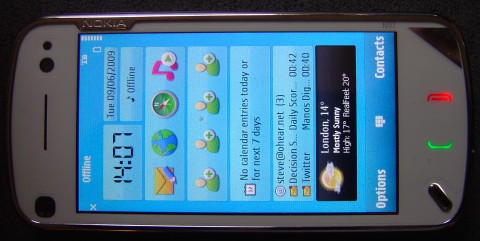
One final word about the User Interface. If you’re a previous Nokia S60 user, you’ll have virtually no learning curve at all, despite the move to a touch screen. If you’re new to S60, there is a steeper learning curve than say the iPhone but Nokia are clearly aware of this and, compared to earlier versions of the OS, things have been tidied up a great deal. Lots of the phone’s settings and features have been streamlined and grouped together more intuitively, and the new home screen brings the most used apps and content right to the surface.
– Steve
Note: I have the device for another week or so. Please leave any questions in the comments and I’ll do my very best to answer them. With your help, consider this review a work in progress.

thanks for the review!
I was afraid of this because I hated it on the Nokia 5800's default browser: “While pages load reasonably fast, it seems that you’re unable to reliably begin scrolling or pretty much do anything, until the whole page has finished loading. Trying to do so feels like you’re fighting the device.”
thanks for the review!
I was afraid of this because I hated it on the Nokia 5800's default browser: “While pages load reasonably fast, it seems that you’re unable to reliably begin scrolling or pretty much do anything, until the whole page has finished loading. Trying to do so feels like you’re fighting the device.”
thanks for the review!
I was afraid of this because I hated it on the Nokia 5800's default browser: “While pages load reasonably fast, it seems that you’re unable to reliably begin scrolling or pretty much do anything, until the whole page has finished loading. Trying to do so feels like you’re fighting the device.”
thanks for the review!
I was afraid of this because I hated it on the Nokia 5800's default browser: “While pages load reasonably fast, it seems that you’re unable to reliably begin scrolling or pretty much do anything, until the whole page has finished loading. Trying to do so feels like you’re fighting the device.”
As I said, the browser is definitely usable but now lags behind the iPhone and Android (and likely the Palm Pre). I suspect it just needs some software optimization. In the meantime, I hope SkyFire and others makes their way across to 5th edition soon. On my E71 I'm spoilt for browsers: Web, Opera Mini, SkyFire, o3, Bolt etc. All of which are pretty good.
As I said, the browser is definitely usable but now lags behind the iPhone and Android (and likely the Palm Pre). I suspect it just needs some software optimization. In the meantime, I hope SkyFire and others makes their way across to 5th edition soon. On my E71 I'm spoilt for browsers: Web, Opera Mini, SkyFire, o3, Bolt etc. All of which are pretty good.
As I said, the browser is definitely usable but now lags behind the iPhone and Android (and likely the Palm Pre). I suspect it just needs some software optimization. In the meantime, I hope SkyFire and others makes their way across to 5th edition soon. On my E71 I'm spoilt for browsers: Web, Opera Mini, SkyFire, o3, Bolt etc. All of which are pretty good.
As I said, the browser is definitely usable but now lags behind the iPhone and Android (and likely the Palm Pre). I suspect it just needs some software optimization. In the meantime, I hope SkyFire and others makes their way across to 5th edition soon. On my E71 I'm spoilt for browsers: Web, Opera Mini, SkyFire, o3, Bolt etc. All of which are pretty good.
Great review Steve.
Im sure several of the aforementioned cravats can be sorted out in future firmware updates, afterall, we are talking V10 here, and who cannot forget what an N95 was like on V10?
As to the keyboard, Im sure its something many will be able to get used to in time.
Great review Steve.
Im sure several of the aforementioned cravats can be sorted out in future firmware updates, afterall, we are talking V10 here, and who cannot forget what an N95 was like on V10?
As to the keyboard, Im sure its something many will be able to get used to in time.
Great review Steve.
Im sure several of the aforementioned cravats can be sorted out in future firmware updates, afterall, we are talking V10 here, and who cannot forget what an N95 was like on V10?
As to the keyboard, Im sure its something many will be able to get used to in time.
Great review Steve.
Im sure several of the aforementioned cravats can be sorted out in future firmware updates, afterall, we are talking V10 here, and who cannot forget what an N95 was like on V10?
As to the keyboard, Im sure its something many will be able to get used to in time.
Agreed, I'm sure the experience will improve with firmware updates, and it's already pretty good. As for the keyboard, I'm sure lots of people will be fine with it but it's not E71 standards. I'm frickin' fast on that thing and was from Day One.
Agreed, I'm sure the experience will improve with firmware updates, and it's already pretty good. As for the keyboard, I'm sure lots of people will be fine with it but it's not E71 standards. I'm frickin' fast on that thing and was from Day One.
Agreed, I'm sure the experience will improve with firmware updates, and it's already pretty good. As for the keyboard, I'm sure lots of people will be fine with it but it's not E71 standards. I'm frickin' fast on that thing and was from Day One.
Agreed, I'm sure the experience will improve with firmware updates, and it's already pretty good. As for the keyboard, I'm sure lots of people will be fine with it but it's not E71 standards. I'm frickin' fast on that thing and was from Day One.
I know where your coming from regards the E71 keyboard. I trialled an E71 myself, and at first hated it, but after just one day with it, I fell in love, so much so, i wrote my entire E71 Review on the device itself.!
I know where your coming from regards the E71 keyboard. I trialled an E71 myself, and at first hated it, but after just one day with it, I fell in love, so much so, i wrote my entire E71 Review on the device itself.!
I know where your coming from regards the E71 keyboard. I trialled an E71 myself, and at first hated it, but after just one day with it, I fell in love, so much so, i wrote my entire E71 Review on the device itself.!
I know where your coming from regards the E71 keyboard. I trialled an E71 myself, and at first hated it, but after just one day with it, I fell in love, so much so, i wrote my entire E71 Review on the device itself.!
Great review and it sounds like Nokia continued the great design tradition of the internet tablet line but incorporating a phone to boot, (love my N810.) I think I may on the hook with this once I see how Ovi develops and how any symbian issues shake out.
Great review and it sounds like Nokia continued the great design tradition of the internet tablet line but incorporating a phone to boot, (love my N810.) I think I may on the hook with this once I see how Ovi develops and how any symbian issues shake out.
Great review and it sounds like Nokia continued the great design tradition of the internet tablet line but incorporating a phone to boot, (love my N810.) I think I may on the hook with this once I see how Ovi develops and how any symbian issues shake out.
Great review and it sounds like Nokia continued the great design tradition of the internet tablet line but incorporating a phone to boot, (love my N810.) I think I may on the hook with this once I see how Ovi develops and how any symbian issues shake out.
It definitely has a bit of the old MID or Netbook about it. I actually prefer it to the N810 tablet though.
It definitely has a bit of the old MID or Netbook about it. I actually prefer it to the N810 tablet though.
It definitely has a bit of the old MID or Netbook about it. I actually prefer it to the N810 tablet though.
It definitely has a bit of the old MID or Netbook about it. I actually prefer it to the N810 tablet though.
Great review Steve. Wow, superb 🙂 Love it.
Great review Steve. Wow, superb 🙂 Love it.
Great review Steve. Wow, superb 🙂 Love it.
Great review Steve. Wow, superb 🙂 Love it.
Great review Steve. Wow, superb 🙂 Love it.
Man this review only makes me crave for this device more and more eh.
Man this review only makes me crave for this device more and more eh.
Man this review only makes me crave for this device more and more eh.
Man this review only makes me crave for this device more and more eh.
Great review, thanks for that!
I'm a little confused at the browser comment where you say the N97 does not always reflow the text on a page. It wasn't unexpected that it wouldn't do so as the 5800 is the same but I'm curious to know what other S60 3rd devices you refer to actually have that feature? If you have seen it reflow some pages I can only think that it will be down to the way the page is constructed. Can you provide any url's so the same can be tried on the 5800 as a comparison?
You touched on the FM transmitter already but I am interested to know how well this works in practice if you have a chance to test it prior to returning the phone?
Thanks again!
Great review, thanks for that!
I'm a little confused at the browser comment where you say the N97 does not always reflow the text on a page. It wasn't unexpected that it wouldn't do so as the 5800 is the same but I'm curious to know what other S60 3rd devices you refer to actually have that feature? If you have seen it reflow some pages I can only think that it will be down to the way the page is constructed. Can you provide any url's so the same can be tried on the 5800 as a comparison?
You touched on the FM transmitter already but I am interested to know how well this works in practice if you have a chance to test it prior to returning the phone?
Thanks again!
Great review, thanks for that!
I'm a little confused at the browser comment where you say the N97 does not always reflow the text on a page. It wasn't unexpected that it wouldn't do so as the 5800 is the same but I'm curious to know what other S60 3rd devices you refer to actually have that feature? If you have seen it reflow some pages I can only think that it will be down to the way the page is constructed. Can you provide any url's so the same can be tried on the 5800 as a comparison?
You touched on the FM transmitter already but I am interested to know how well this works in practice if you have a chance to test it prior to returning the phone?
Thanks again!
Great review, thanks for that!
I'm a little confused at the browser comment where you say the N97 does not always reflow the text on a page. It wasn't unexpected that it wouldn't do so as the 5800 is the same but I'm curious to know what other S60 3rd devices you refer to actually have that feature? If you have seen it reflow some pages I can only think that it will be down to the way the page is constructed. Can you provide any url's so the same can be tried on the 5800 as a comparison?
You touched on the FM transmitter already but I am interested to know how well this works in practice if you have a chance to test it prior to returning the phone?
Thanks again!
Great review and good to see the point about keyboards. I fear it might be important for many of us for some time to come. Feel a bit wistful as I'm just coming off Nokia and feel it's been closer to what I want than others. Would like this with Android! Could it ever happen?
Great review and good to see the point about keyboards. I fear it might be important for many of us for some time to come. Feel a bit wistful as I'm just coming off Nokia and feel it's been closer to what I want than others. Would like this with Android! Could it ever happen?
Great review and good to see the point about keyboards. I fear it might be important for many of us for some time to come. Feel a bit wistful as I'm just coming off Nokia and feel it's been closer to what I want than others. Would like this with Android! Could it ever happen?
Great review and good to see the point about keyboards. I fear it might be important for many of us for some time to come. Feel a bit wistful as I'm just coming off Nokia and feel it's been closer to what I want than others. Would like this with Android! Could it ever happen?
Regarding the re-flowing of text, my experience is based on S60 3rd Edition devices, specifically the E71, N85 and E75. You're right, the 5800 didn't reflow text very well either…
http://www.last100.com/2008/11/10/ive-been-play…
I'll try and test the FM transmitter tomorrow and get back to you here.
Regarding the re-flowing of text, my experience is based on S60 3rd Edition devices, specifically the E71, N85 and E75. You're right, the 5800 didn't reflow text very well either…
http://www.last100.com/2008/11/10/ive-been-play…
I'll try and test the FM transmitter tomorrow and get back to you here.
Regarding the re-flowing of text, my experience is based on S60 3rd Edition devices, specifically the E71, N85 and E75. You're right, the 5800 didn't reflow text very well either…
http://www.last100.com/2008/11/10/ive-been-play…
I'll try and test the FM transmitter tomorrow and get back to you here.
Regarding the re-flowing of text, my experience is based on S60 3rd Edition devices, specifically the E71, N85 and E75. You're right, the 5800 didn't reflow text very well either…
http://www.last100.com/2008/11/10/ive-been-play…
I'll try and test the FM transmitter tomorrow and get back to you here.
Android on Nokia's hardware would be pretty cool. But it's very unlikely. Nokia have the Symbian Foundation and a linux-based OS of the own called Maemo, which Intel are also supporting.
http://maemo.org/
Android on Nokia's hardware would be pretty cool. But it's very unlikely. Nokia have the Symbian Foundation and a linux-based OS of the own called Maemo, which Intel are also supporting.
http://maemo.org/
Android on Nokia's hardware would be pretty cool. But it's very unlikely. Nokia have the Symbian Foundation and a linux-based OS of the own called Maemo, which Intel are also supporting.
http://maemo.org/
Android on Nokia's hardware would be pretty cool. But it's very unlikely. Nokia have the Symbian Foundation and a linux-based OS of the own called Maemo, which Intel are also supporting.
http://maemo.org/
Are you that the DLNA was omitted? The spec at http://www.forum.nokia.com/devices/N97 under “connectivity” calls out UPnP. This is one of the feature I liked a lot on my N95.
Are you that the DLNA was omitted? The spec at http://www.forum.nokia.com/devices/N97 under “connectivity” calls out UPnP. This is one of the feature I liked a lot on my N95.
Are you that the DLNA was omitted? The spec at http://www.forum.nokia.com/devices/N97 under “connectivity” calls out UPnP. This is one of the feature I liked a lot on my N95.
Are you that the DLNA was omitted? The spec at http://www.forum.nokia.com/devices/N97 under “connectivity” calls out UPnP. This is one of the feature I liked a lot on my N95.
Pretty sure the UPnP here refers to auto-discovery of WiFi networks not UPnP AV (DNLA certified), which is what I think is missing. I too really enjoyed the feature on the N85 I reviewed.
Pretty sure the UPnP here refers to auto-discovery of WiFi networks not UPnP AV (DNLA certified), which is what I think is missing. I too really enjoyed the feature on the N85 I reviewed.
Pretty sure the UPnP here refers to auto-discovery of WiFi networks not UPnP AV (DNLA certified), which is what I think is missing. I too really enjoyed the feature on the N85 I reviewed.
Pretty sure the UPnP here refers to auto-discovery of WiFi networks not UPnP AV (DNLA certified), which is what I think is missing. I too really enjoyed the feature on the N85 I reviewed.
You have an error you say 32MB(in bold text) of internal storage when it is really 32GB. Great Review keep up the good work
You have an error you say 32MB(in bold text) of internal storage when it is really 32GB. Great Review keep up the good work
You have an error you say 32MB(in bold text) of internal storage when it is really 32GB. Great Review keep up the good work
Thanks for that. Corrected now. I'm surprised nobody (me included) spotted the mistake until now!
Thanks for that. Corrected now. I'm surprised nobody (me included) spotted the mistake until now!
Thanks for that. Corrected now. I'm surprised nobody (me included) spotted the mistake until now!
I tried the FM transmitter out today. It worked OK, better than other phones I've tried but perhaps not as strong as the N85. It also appeared to work better when Bluetooth was turned off but that may have been a coincidence. Hope that helps.
I tried the FM transmitter out today. It worked OK, better than other phones I've tried but perhaps not as strong as the N85. It also appeared to work better when Bluetooth was turned off but that may have been a coincidence. Hope that helps.
I tried the FM transmitter out today. It worked OK, better than other phones I've tried but perhaps not as strong as the N85. It also appeared to work better when Bluetooth was turned off but that may have been a coincidence. Hope that helps.
Why didn't they (Nokia) do a keyboard like the E75 on the N97? there is plenty of space… Would you think the keyboard on the N97 is a cause of concern and should be considered a valid reason not to get this phone? (I currently have the 5800XM). Also the touchscreen, not sure about it on the 5800 either. Is touch on the N97 quicker than that on the 5800? Is it more responsive? Which would you use if you were writing a text, the keyboard or the touch screen?
Why didn't they (Nokia) do a keyboard like the E75 on the N97? there is plenty of space… Would you think the keyboard on the N97 is a cause of concern and should be considered a valid reason not to get this phone? (I currently have the 5800XM). Also the touchscreen, not sure about it on the 5800 either. Is touch on the N97 quicker than that on the 5800? Is it more responsive? Which would you use if you were writing a text, the keyboard or the touch screen?
Why didn't they (Nokia) do a keyboard like the E75 on the N97? there is plenty of space… Would you think the keyboard on the N97 is a cause of concern and should be considered a valid reason not to get this phone? (I currently have the 5800XM). Also the touchscreen, not sure about it on the 5800 either. Is touch on the N97 quicker than that on the 5800? Is it more responsive? Which would you use if you were writing a text, the keyboard or the touch screen?
I wouldn't say the keyboard on the N97 is a deal breaker but it could be better. I'd certainly use the keyboard over the touch screen for most text entry. Touch does seem to be a bit more responsive than the 5800 but as I don't have one I can't compare back to back.
I wouldn't say the keyboard on the N97 is a deal breaker but it could be better. I'd certainly use the keyboard over the touch screen for most text entry. Touch does seem to be a bit more responsive than the 5800 but as I don't have one I can't compare back to back.
I wouldn't say the keyboard on the N97 is a deal breaker but it could be better. I'd certainly use the keyboard over the touch screen for most text entry. Touch does seem to be a bit more responsive than the 5800 but as I don't have one I can't compare back to back.
Can the FM transmitter be used as a speakerphone in the car?
Can the FM transmitter be used as a speakerphone in the car?
Can the FM transmitter be used as a speakerphone in the car?
Thanks for a most informative review. A couple questions I'd love to have answered, if possible.
1) How does multi-tasking work, ie, how fluidly can a person switch back and forth between a few running apps?
2) How do various notifications work, such as if someone is pinging you with an instant message in the background (assuming you have an IM client running)? Would or could you get some kind of indicator on the homescreen? ditto for incoming text messages?
Being used to Blackberry, these are a couple of beloved conveniences I'd hate to have to part with, but this phone is quite tempting.
Thanks!
Thanks for a most informative review. A couple questions I'd love to have answered, if possible.
1) How does multi-tasking work, ie, how fluidly can a person switch back and forth between a few running apps?
2) How do various notifications work, such as if someone is pinging you with an instant message in the background (assuming you have an IM client running)? Would or could you get some kind of indicator on the homescreen? ditto for incoming text messages?
Being used to Blackberry, these are a couple of beloved conveniences I'd hate to have to part with, but this phone is quite tempting.
Thanks!
Hi Diggyd, here's my answers…
1. Multi-tasking works really well. Simply press and hold the hardware menu button and an application switcher appears, enabling you to bring to the front any of the open apps etc.
2. Text message updates automatically appear on the homescreen via a widget I think. It's pretty similar to the way Nokia phones have always worked. As for an IM client, you get audio or vibrate alerts and in the future I'm sure many IM clients will add a widget for the N97's homescreen.
I hope this helps.
Hi Diggyd, here's my answers…
1. Multi-tasking works really well. Simply press and hold the hardware menu button and an application switcher appears, enabling you to bring to the front any of the open apps etc.
2. Text message updates automatically appear on the homescreen via a widget I think. It's pretty similar to the way Nokia phones have always worked. As for an IM client, you get audio or vibrate alerts and in the future I'm sure many IM clients will add a widget for the N97's homescreen.
I hope this helps.
Helps a great deal. Really appreciate it!
Helps a great deal. Really appreciate it!
It’s truly a great and helpful piece of information. I’m happy that you shared this hewlpful
information with us. Please keep us up to date lile this.
Thanks forr sharing.
I was wondering if you ever thought of changing the page
layout of your blog? Its very well written; I love what youve
got to say. But maybe you could a little more in the way of
content so people could connect with it better. Youve got an awful lot of text for only having one
or two images. Maybe you could space it out better?
It’s going to be finish of mine day, except before ending I am reading this fantastic
paragraph to improve my experience.
ハロー!実はうちはしょっちゅう悩みがあります。増えているのです。ですから毎日育毛剤などで対策をやってきました。でもね本当に禿には、あんまり効果がでませんね。これまでプロペシアなどの育毛剤や育毛サプリを使ってきました。少しは効果はあったんだけどね。このままだと、もっと薄毛が進行してしまい、時期にツルツルの頭になってしまうでしょう。そんな重い将来は迎えたくないです。そのため、もう育毛シャンプーだけでは改善できないでしょう。ですから覚悟を決めました。私は植毛をします!植毛といっても人口植毛ではなく、自分の後頭部の毛でやる自毛植毛です。いろんなサイトを見て評判のよさそうな、アイランドタワークリニックか高須クリニックとかがいいかなと直感で思ったんです。とくに決め手は実績の高さですね。やはり安心感は必要なことですからね。1番はアイランドタワークリニックかな。まずはお金のことが心配ですので、カウンセリングをしてみてから、本当に自毛植毛を受けようと思います。自毛植毛の体験談を見てみると、植毛後はプランテルなどの育毛剤や育毛サプリを使っていくみたいです。
Terrific post however I was wanting to know if you could write a litte more on this topic?
I’d be very grateful if you could elaborate a little bit more.
Bless you!
Today utilizing our on-line Clash Royale Tips receive your Battle Royale free of cost gems, Tips and Gems
Tool.
Of course I also pick up matching shower curtains and rugs.
If you are unable to see the property a second or third time
you still have ways of ensuring you’re not walking into a lemon. Secondly,
with regard to your job, you need to go somewhere that has enough opportunity for you to progress.
Agachamentos salutar exercícios que trabalharão diferentes prendas de seus carne das
pernas. http://usa-talk.net/entry.php/93422-O-Papel-Do-Nutricionista-No-Tratamento-Da-Anorexia
Fine way of describing, and good post to get information about my presentation topic,
which i am going to deliver in college.
Amazing! Its really awesome article, I have got much clear idea regarding from this paragraph.
What a information of un-ambiguity and preserveness of valuable know-how
concerning unpredicted emotions.
Every Midi Baccarat desk will probably be restricted to 18 gamers.