
See also: Video demo: Nokia XpressMusic 5800’s media playback features
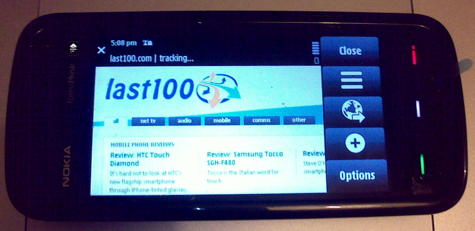
Ever since Nokia officially announced its new consumer touchscreen smartphone, the 5800 XpressMusic (aka the “Tube”), I’ve been dying to get my hands on the device. Not because I was expecting an iPhone killer — it isn’t and probably wasn’t really intended to be — but because I was curious to see how well Nokia could adapt its S60 user interface for a touchscreen phone. After a few days playing with the 5800, albeit a ‘prototype’, here are my initial impressions.
What I like
- Physical buttons. Although the 5800 is a touchscreen device, Nokia have made smart choices when it comes to physical buttons. There’s the usual call start and end, dedicated home button, as well as volume up and down, camera shutter, and best of all, a spring loaded rocker switch for locking and unlocking the screen.
- Responsive. Unlike other touchscreen phones I’ve tested recently, the 5800’s UI feels pretty responsive. There’s no or very little delay upon key presses (virtual or physical), and generally the processor seems more than up to the job of running the new touchscreen version of S60.
- Finger friendly and fairly intuitive UI. Despite Nokia’s choice to employ a resistive touchscreen (see below), Nokia have done a pretty good job at adapting S60 for finger operation. The use of large fonts and on-screen buttons is very welcome. The UI is also fairly intuitive, although I’m admittedly very accustomed to S60 (my daily phone is a Nokia e71). However, like with previous efforts, getting to certain functions seems to require one click more than necessary.
- The ‘Media Bar’. The 5800 includes a dedicated soft button just above the screen that brings up what Nokia is calling the ‘Media Bar’. Essentially it’s a vertical dock with shortcuts to all of the phone’s media playback features, along with web browsing and online sharing.
- The ‘Contacts Bar’. A neat feature that Nokia should certainly expand on whereby you can highlight four favorite contacts on the home-screen and, “through a single touch, track a digital history of recent text messages, emails, phone logs, photos and blog updates.”
- Virtual keyboards. From T9, mini QWERTY to fullscreen QWERTY, lots of choices. There’s even handwriting recognition, which works better than I expected.
- Loud speakers. This will annoy the hell out of people traveling on public transport but is really handy when watching video on the 5800.
What I don’t like
- Resistive touchscreen. While the 5800’s UI is finger friendly, the device’s touchscreen isn’t entirely. Like HTC’s Touch Diamond, the 5800 employs a resistive rather than capacitive touchscreen designed primarily for stylus not finger input. The result is that finger presses needs to be more defined than feels natural (it’s works best when using a finger tip or finger nail). Instead, I’d much prefer a capacitive touchscreen as used by the iPhone.
- It’s chunky. The 5800 won’t win any prizes in the looks department, least not post-iPhone. In particular, the device is chunky, which is disappointing as Nokia can do sleek and slim — just look at the e71.
- Web browsing is under par. This one surprised me a lot as Nokia’s S60 browser is usually very good, the closest to the iPhone’s yet. However, unlike previous versions, columns of text don’t re-flow intelligently to fit on the device’s screen, meaning endless and fiddly zooming and scrolling. I’m hoping this is something Nokia will address when the 5800 hits full production.
- At times it’s not obvious how to invoke the virtual keyboard. This one is hard to explain, but when I first played with the phone I was stumped on how to bring up the on-screen keyboard. An input field was displayed on-screen — asking for my WiFi network’s password for example– along with a flashing cursor, but still no keyboard popped up. It then takes a further tap in the field itself to actually bring up the keyboard. Not at all obvious, especially for somebody coming from an iPhone.
- White text on light gray. Again it’s a gripe with the virtual keyboard. When typing, text is previewed in white on a light gray background. Not the most user friendly choice of colors!
That’s it for now — I hope to keep the 5800 for a few more weeks — if you have any questions on the device, leave a comment and I’ll do my best to answer them.

I just bought the E71 yestarday after debating between for the 5800. Since you’ve used both, would I be right to say the E71 is still a better device? Plus I’m still still iffy of touch screens, nothing beats substance i.e. real keys on a real keyboard.
@ IncidentFlux
I prefer the e71 yes. Although they are very different devices. If you’re a QWERTY physical keyboard person then you’ll love the e71.
My favorite phone right now is the Krave by Motorola. I became a huge fan of the Krave once I started working with Motorola. You can check out the full spec list online at motorola.com/krave. It’s definitely strong competition with it’s full touch screen
how does the zooming of a picture work?
clicking and dragging away 2 fingers like in the ipod?
To zoom in on a photo you tap the screen and up pops an on-screen plus and minus button and slider control. You can then either tap on the + and – sign or move the slider up and down to zoom in and out. To pan around an image just click and drag.
Wonderful Evaluation
A quick one for you does the 5800 support VOIP, do you see internet call in the options when your dialing, I have it on my N95 and II would really like to see my SIP setting program on my prospective 5800
Thanks for your response
Just got my 5800, it does have the SIP settings menu, and it registers with sip, but cannot enable internet call or receive call when connected to SIP. Anyone has got it working????
you will need third party app to use voip
hey.so i brought the 5800,like out of the blue,on the last day of a holiday and the one thing i cannot figure out is why the screen goes all black whenever someone calls or messages.so basically it freezes and repeats the callers name..but i need to see whose calling or messaging.but its an excellent phone nonetheless..any ideas on how i am supposed to fix that?
hey.. any 3rd party SIP client released for Nokia 5800. Anyone able to make VoIP calls from 5800 yet ?
The screen of Nokia 5800 music express going blank/black. on calling and receiving calls…..
I faced a similar problem. Took the phone to Nokia Care. He removed the memory card and then tried making and recieving calls. It worked fine. then. According to him, some was transferred to the card, which was unreadable or corrupted. He asked me to scan the memory card and then try again. I did the same. I had transferred some ring tones in the morning which were inside few folders. I removed the folders within folder and copied them back again in the memory card in only a single directory. The problem was solved.
I hope this solves some of your problems.
iphone or 5800?
such a dilemma!! help.
yeah my 5800 has problem with the screen going blank on calls Dont understand it!!!
@Roboguard
The 5800’s screen is meant to lock and go blank when you place it near your ear, to prevent accidental screen presses. Maybe that is the “issue”?
@Roboguard and Steve O’Hear
I had “going black/blank” issue. It is actually going black rather than blank. Besides black, it used to go green, magenta and cyan too. Funny eh? Annoying to be exact.
Mine one was actually a light sensor issue, as Nokia Care described me. They changed the sensor (or whatever I do not know) and now everything is working fine.
I updated to v20.0.012 and now my 5800 works way better (and more responsive).
*me happy*.
@ Raihan Hasnain Rahman
Thanks for that. Glad it’s working out now 🙂
All the Points i agree with the Nokia 5800 Express Music i want to unlock the Mobile i found the Unlocking instructions in the site http://www.mobileunlockguide.com i want code? for unlock it from vodafone UK help me please thanks in advance.
All the Points i agree with the Nokia 5800 Express Music i want to unlock the Mobile i found the Unlocking instructions in the site http://www.mobileunlockguide.com i want code? for unlock it from vodafone UK help me please thanks in advance.
I have a big problem with the screen of my new Nokia 5800, for less than a week, it is in bad condition already,i mean the phone didnt fell of the ground nor exposed to watery surface.my gosh…it gives me a big problem,,it is a hassle for me.hope that this wont happen to other phones, hope they will develop the weakness and flaws of the nokia 5800
I have a big problem with the screen of my new Nokia 5800, for less than a week, it is in bad condition already,i mean the phone didnt fell of the ground nor exposed to watery surface.my gosh…it gives me a big problem,,it is a hassle for me.hope that this wont happen to other phones, hope they will develop the weakness and flaws of the nokia 5800
I'am not able to surf net when i try to connect through my WLAN broadband connection. The error is “No gateway reply”. Please help!
I'am not able to surf net when i try to connect through my WLAN broadband connection. The error is “No gateway reply”. Please help!
Hi there, I would ike to subscribe for this weblog to take most up-to-date updates,
therefore where can i do it please help.
A fascinating discussion is definitely worth comment.
I do believe that you should publish more about this subject, it may not
be a taboo matter but generally people do not discuss such issues.
To the next! Many thanks!!
Very good blog! Do you hav any recommendations ffor aspiring writers?
I’m planning to start my own site soon but
I’m a little lost onn everything. Would you recommend starting with a free platform like WordPress orr go for a paid option?
There are so many choices out there that I’m completely overwhelmed ..
Any tips? Bless you!
Howdy! I could have sworn I’ve been to this
blog before but afger browsing through some of the articles I realized it’s new
to me. Anyhow, I’m certaionly happy I found it annd I’ll be
book-marking itt and checking back regularly!
If soje one desires tto be updated with most up-to-date technologies afterward he must be pay
a visit this web page aand be up to date all the time.
Please let me know if you’re looking for a article writer for your weblog. You have some really good posts and I believe I would be a good asset. If you ever want to take some of the load off, I’d really like to write some content for your blog in exchange for a link back to mine. Please blast me an e-mail if interested. Regards!