
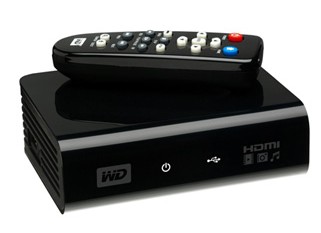
 Sometimes a seemingly complex problem requires the simplest of solutions. Case in point is Western Digital’s WD HD Media Player, which provides a near fool-proof way of watching almost any video downloaded from the Internet on the TV. The device can also be used to view photos and as a music player.
The tiny box – about the size of a small paperback book, only thicker – does away with WiFi or Ethernet and all the potential hassles of a streaming over a home network. Instead, you simply connect it to the television (preferably a High Def one via HDMI) and insert a USB thumb drive or any other mass storage USB device in which your content is stored and you’re good to go. Of course, the WD HD Media Player isn’t the first product to take this non-networked approach to shuttling content downloaded from the Internet via PC to the TV, but here’s where it beats most of the competition. Throw virtually any file format at the device and it plays.
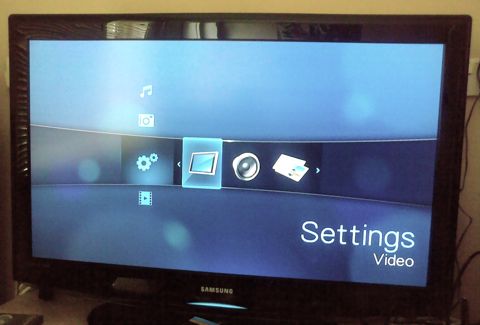
WD HD Media Player on a High Def TV
There’s one caveat, of course: Like almost any standalone media player that isn’t permanently connected to the Internet, the WD HD Media Player doesn’t support DRMed content that requires the device to ‘phone home’ for authentication before it will play. However, that’s unlikely to be an issue with the type of person who’s in the market for a ‘kitchen sink an all’ media player, such as the WD HD, if you catch my drift.
On that note, the WD HD Media Player supports all the usual suspects:
Music – MP3, WMA, OGG, WAV/PCM/LPCM, AAC, FLAC, Dolby Digital, AIF/AIFF, MKA
Photo – JPEG, GIF, TIF/TIFF, BMP, PNG
Video -MPEG1/2/4, WMV9, AVI (MPEG4, Xvid, AVC), H.264, MKV, MOV (MPEG4, H.264),
MTS, TP, TS
Playlist – PLS, M3U, WPL
Subtitle -SRT (UTF-8), SMI, SUB, ASS, SSA
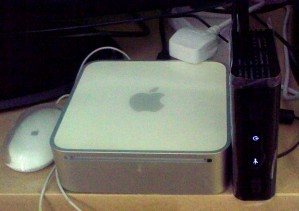
WD HD Media Player, smaller than a Mac Mini
For those with a keen eye, you’ll have noticed the inclusion of H.264 support and, crucially, MKV, an up and coming file format for high def video, such as Blu-ray rips, that is fast replacing the combination of DivX/Xvid wrapped in an AVI. In other words, the WD HD Media Player, as the name suggest, really excels when it comes to playing back high definition video. In our tests, we threw at it MKVs, Quicktime movie trailers in 1080p, and a standard MP4 (720p H.264) home movie that had been shot on a Sanyo Xacti camcorder. All of them played back flawlessly. That can’t be said of my current set-up, a combination of a PlayStation 3 and an aging core solo Mac mini, both of which struggle with certain file formats or HD content.
The WD HD Media Player’s User Interface isn’t bad either. It looks pretty and gets the job done efficiently. Using the supplied remote you can comfortably navigate even large media collections – it’s best to switch from thumbnail to ‘list’ view – by directory or in library mode where it will index your entire media collection, even if its spread over two USB drives via the two available slots so that you can view by media type – photos, music or video – rather than file structure.
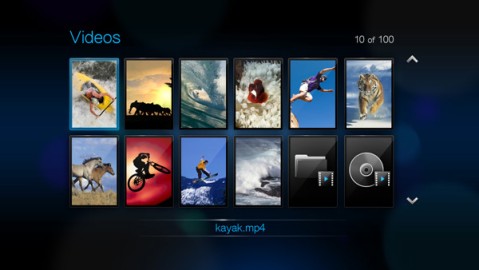
Browsing video on the WD HD Media Player
My only real complaint with the WD HD Media Player isn’t the player itself but the 2GB file size limit imposed by the FAT32 format used by most USB thumb drives. Movies in full HD start at well over 4GB in size, therefore it’s best to use a hard disc-based USB drive formatted with NTFS (on Windows, for example) instead.
Oh and best of all is the price: around £80 here in the UK. Not bad for something that just works.

By Dolby Digital presumably DTS but no AC3 ??? and MKV is a dead format (and rather pointless, offering nothing useful over AVI) like OGM so why not both, or neither
By Dolby Digital presumably DTS but no AC3 ??? and MKV is a dead format (and rather pointless, offering nothing useful over AVI) like OGM so why not both, or neither
I don't quite follow your point. But to clarify, the WD HD Media Player of course supports AVI along with MKV and Quicktime wrappers.
I don't quite follow your point. But to clarify, the WD HD Media Player of course supports AVI along with MKV and Quicktime wrappers.
Just format the thumbdrive in NTFS to overcome 2GB limit.
Just format the thumbdrive in NTFS to overcome 2GB limit.
In my opinion not having network (ethernet or Wifi) access is a major disadvantage in a media player considering a lot of people have Network Storage Devices holding all their media or computers storing downloaded media files. It seems so “yesterday” to copy media onto a memory card or onto a USB Storage and then to plug into a WD HD.
Something like the Popcorn Hour, which has come along way since it was released back in 2007/2008 and it really does support every media format under the sun and can access video on demand, all the free video sites such as Google Video, Youtube, StumbleVideo etc.
In my opinion not having network (ethernet or Wifi) access is a major disadvantage in a media player considering a lot of people have Network Storage Devices holding all their media or computers storing downloaded media files. It seems so “yesterday” to copy media onto a memory card or onto a USB Storage and then to plug into a WD HD.
Something like the Popcorn Hour, which has come along way since it was released back in 2007/2008 and it really does support every media format under the sun and can access video on demand, all the free video sites such as Google Video, Youtube, StumbleVideo etc.
The Popcorn Hour does look like an awesome media player but at a cost. For some people, the WD HD will meet their needs and budget. Good to have both options in the marketplace 🙂
The Popcorn Hour does look like an awesome media player but at a cost. For some people, the WD HD will meet their needs and budget. Good to have both options in the marketplace 🙂
1080p UPnP Media Player: Mvix Ultio is a compact box supporting popular formats such as MP4, H.264, DivX HD, MOV, VC-1, FLV, VOB, WMV and AVI as well as MKV, AVC-HD, RMVB and Minus VR. Also it can play a variety of audio formats. I have noticed the best feature in this model is Ultio can connect to the Internet via a built-in Ethernet port or through a Wi-Fi network.
WD HD Media Player is the real deal.