
Late yesterday afternoon I purchased one of the new Macbooks (announced on Wednesday) and in the process finally retired my trusty 12 inch Powerbook from daily blogging duties.
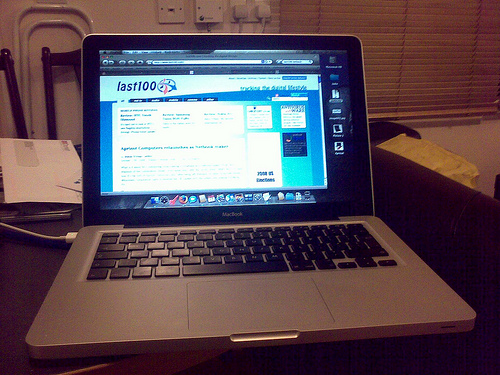
I’ve only really had the new machine fully set up and operational for about a day (after transferring over my user accounts/data, and installing essential apps such as Firefox, Skype etc.), and while I may get around to doing a full review, I wanted to first share my initial impressions, a few of which have surprised me.
New ‘unibody’ casing
The new Macbook looks absolutely stunning. It’s fair to say that aesthetically this is Apple’s best Macbook yet – the plastic casing is gone and the Macbook now shares the same external design as the updated Macbook Pro. The so-called ‘unibody’ casing, in which the Macbook’s aluminum shell is made from one solid block of metal with no obvious joins, doesn’t just add to the machine’s good looks but also feels exceptionally solid and durable. Unlike my old 12 inch Powerbook there are no obvious ‘crumb’ traps below the keyboard – a real bonus for somebody who frequently eats lunch at their desk (I know I shouldn’t).
Buttonless trackpad
 The large glass trackpad is a mixed bag but on the whole is more good than bad. Doing away with the conventional trackpad button – instead, the whole trackpad is clickable – actually works very well. If your muscle memory has you clicking with your thumb in the area usually found just below the trackpad, you’ll likely notice no difference. At the same time, you now have the option to click anywhere on the trackpad with your fingers too. Right-clicking, if switched on in System Preferences, works just fine too.
On the downside, I’m finding the trackpad click to be on the noisy side, though this may quieten down as the mechanism wears in a little. The only other negative is that the glass finish of the trackpad is a little too smooth and occasionally I’ve found my hand slipping a few millimetres just as I’m about to click. Again, this is something that may well improve over time with practice.
Multi-Touch
I’ll admit I was skeptical about the usefulness of further Multi-Touch gestures beyond Apple’s original two-finger scrolling, thinking that they were a bit on the gimmicky side. However, this is proving not to be the case. So far I’ve been regularly utilizing the four-finger downwards gesture to invoke OSX’s Expose, as well as the occasional four-finger horizontal swipe to bring up Application switching. Being that my disability makes it a little harder to reach the Mac’s F keys or instigate certain key combinations, having the option to replicate some of this functionality through gestures could prove to be a real accessibility boon. If only Apple would let you program your own gestures.

I wish they’d change the color of the white powercable. Why not just run OS X on your Wind clone? I’m torn… I’d like a smaller laptop and the idea of that 24″ docking station/monitor is appealing. But not cheap.
alright, I’m jealous. Interesting about the click being a bit loud. I’m also interested in whether the CD drive is still so insanely loud and if there are ever any discernible high pitched whines from the fan.
The new build aluminum body makes me consider getting one with apple care as a “long term” investment rather than just praying my laptop will survive a little past my usual 1 year life expectancy for a laptop.
@ Dave Zatz
I will probably try installing OSX on the rebadged Wind but have held back because you need to swap the WiFi card for one with OSX drivers available and you also lose the mic and headphone ports and built-in mic also. Hardly ideal. As for buying a Macbook, while I really like Netbooks, a 10.1 inch screen is just a tad too small for everyday blogging duties – certainly the way I manage my screen real estate.
@ Daniel
Jealous? So you should be 🙂 Haven’t even noticed the fan kick in yet. As for the Optical drive, not tested yet!
I’m at the Apple Store now and while the ambient noise is louder than home, the mouse “button” doesn’t seem any louder than my last generation 15″ MBP. In fact, it feels quite similar.
Great review-hope you share another when you’re even more accustomed. I’m thinking HARD about making the switch to Mac for my next laptop.