
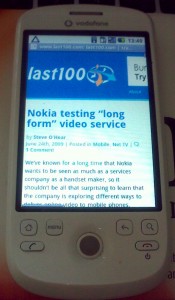
 Let me preface this by saying that there is a lot to like about Android and that the smartphones being powered by the Google-led OS are going to get better and better. I’m especially excited by the UI customization that HTC and Motorola, for example, have been developing on top of Android, testament to the mobile OS’s overall potential and, of course, openness.
(I’m expecting a loan of the social networking savvy HTC Hero later today, thanks to UK carrier Orange. A full review of the Hero should follow shortly.)
However, having lived with the Vodafone HTC Magic for a few months now, there are a few things that really bug me about the standard version of Android. Yes, this is going to be a bit of rant.
1. Notifications and Gmail
Two areas where Android is supposed to excel: Background notifications and integration with Gmail. Firstly, I’m not a big fan of the notifications draw of Android as I find the “finger-friendly” target of the draw itself to be a bit fiddly to hit and drag open at times. And even though the draw is accessible no matter which app you currently have open or in view, dragging it down every time to view the full list of notifications or any meaningful info gets old really quick. That said, I can just about live with the notifications draw itself but the way Gmail alerts are implemented makes me want to throw my HTC Magic under a bus. Let explain.
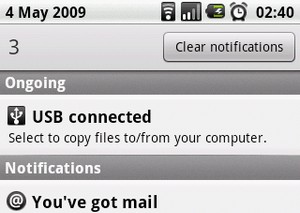 I receive a new email and the email icon appears at the top of the screen.
Fine.
I click and drag open the notifications draw to read the first line of the email and who it’s from.
So far, so good.
I then click on the email, expecting to be taken to the Gmail app and to the full email itself, but instead I’m dropped into the Gmail in-box where I have to click on the same email again to read the full content. That’s right, the Google phone can’t do efficient Gmail notifications. The standard Android homescreen is also useless when it comes to email alerts, especially compared to my Nokia E71 or any standard Symbian S60 phone.
2. Third-party app updates
I’ve virtually given up updating the majority of my third-party apps that I’ve downloaded from the Android Market. That’s because every app update — these are very frequent, which is a good thing — involves at least two clicks for each app. First to initiate the update and second to, once again, give the app all of its required permissions. This is really tedious to do when you have lots of third-party apps installed.
In contrast, the iPhone and iPod touch gives the option to ‘update all’, a one-click procedure.
Of course, Apple has the advantage of vetting all apps in the App Store, presumably negating the need for the user to check the list of required permissions with each and every app update to see if they have been sneakily changed. But still, there must be a better way.
3. Android Market and Google Checkout
 I haven’t bought a single third-party app for my Android phone. And believe me, I’ve tried. The reason is that the Android Market requires a Google Checkout account. Of course I have one of these but bizarrely it’s not accepted by Google’s mobile app store. When I signed up to Checkout, I used a non-standard Gmail address (instead, one powered by a “Google Apps for your domain” account), which works fine for all of my Checkout purchases elsewhere on the Web but not through the Android Market.
There you have it. Let me know your own Android gripes in the comments…
Image Credit: Notifications draw – Techradar.com

Google checkout and its failings are IMO the #1 hindrance to the success of the Android Market. First of all, it should work (duh), and secondly, people should be able to use PayPal, or (ideally) bill to their mobile carrier's account.
Google, like Apple with iTunes, wants to own the customer billing relationship. But I agree, Checkout should work, and other options should be provided. I feel sorry for developers until this is fixed.
Sorry to hear you're having difficulties with the GMail part of the Android OS Steve. I must admit I quite like the fact that clicking on the notification takes you to your inbox, it's particularly useful if you get 2 or 3 emails at once and it means that you can head back to the inbox just by clicking on the back button (rather that that selfsame back button taking you straight back to your desktop!) Of course, like all interface issues, I realise that YMMV.
I was however surprised that you have difficulties with the Notification bar itself, I've actually found the opposite to be true, sometimes it's just too sensitive and moves down when I was scrolling. But then again I'm on a G1 so I don't know if the Magic is maybe a little “stickier”
I'm with you 100% on the updates issue though. Having to check the permissions again and again as well as that annoying “Verifying Credit Card” screen that you get when updating paid apps. (I know you're having problems with that so sorry if it seems that I'm rubbing salt in the wound!) – The Verifying Credit Card message has caused a few people on the market to object to being charged twice (even though they aren't) so it's definitely not the most efficient way to handle updates.
I'm also a bit confused with the problems that you've had with the Google Checkout. You mentioned that you don't have a Google Apps for your domain account. I use my @aol.com email address to log in to all of my Google services – including Checkout so I'm wondering if this is a more specific issue. Have you tried contacting Google about this to see if it's a known issue?
But, all in all, thanks for writing this. It's great to find out other opinions about Android and the only way that it's going to improve is if people speak up!
Ethan
Thanks for your comments and thoughts. I agree that the back button should take you to the in-box not the homescreen, so if my method was used that would also need to be the case.
My Google Checkout account is linked to a non Gmail address but it's not accepted by Android Market. No idea why.
Forgot to add: the Magic's screen is less sensitive right at the edges, so maybe that's my notifications draw problem. I'm currently testing the HTC Hero, and what they've done with Android's UI is fantastic. Definitely restores my faith in what is possible with Google's OS.
I'd really like to see Google's apps work better together on Android. One example: Addresses in GCal aren't linking to Google Maps. Works fine on the web, so why not on Android?
I want to add one more item to this list: TouchDown. It is a poorly written application. I suggested to them to add a feature like the one watchflag has, but I didn't get any replay. I am moving away from Android.
I Really Want You To STFU