
This is the second article in a two part series exploring Microsoft’s Internet TV strategy.
 In part one, we looked at the history of Microsoft’s Internet TV initiatives. We now turn our attention to examining what you can do with the company’s products and services today, and we’ll finish with some thoughts on what to expect in the future.
Today, Microsoft’s three main television products are Windows Media Center, Xbox 360, and Mediaroom (formerly Microsoft TV IPTV Edition). Let’s look at each in turn.
 Windows Media Center is essentially an application running on top of Windows that acts as a central access point for home entertainment. It provides an alternative interface which makes it easy to browse photos, watch television or movies, and listen to music. One of the big advantages of Windows Media Center is that there’s still a full-blown computer underneath, meaning a Media Center PC can pull double-duty as an entertainment device and workstation. Another advantage is that Windows Media Center is just software, which can run on pretty much any hardware that meets the minimum requirements.
How to get it: By purchasing a Media Center PC running Windows XP Media Center Edition, or by purchasing the Home Premium or Ultimate editions of Windows Vista and a supported TV tuner.
Main competitors: TiVo (see our coverage), SageTV, Beyond TV, MythTV
Key advantages: Full-blown Windows PC under the covers, not tied to a specific set-top box.
Development: Supports any Windows application that can run on XP/Vista, also has a separate SDK.
 Though primarily a gaming console, the Xbox 360 includes some impressive entertainment features. Game trailers and music videos can be downloaded via Xbox Live, and on-demand TV shows and movies can be purchased from the Xbox Live Video Marketplace.
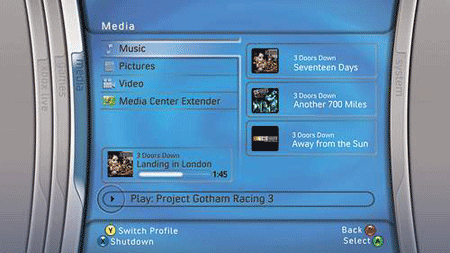
The console also acts a Windows Media Center Extender, and can thus stream live television from a Media Center PC. The big advantage with the Xbox 360 is that users can play games and access media all using a single device attached to the best screen in the house – the television.
How to get it: Console ranges from $299.99 for the Core System, to $479.99 for the Elite system. HDTV shows are 240 MS Points, SDTV shows are 160 MS Points. New HD movies are 480 MS Points, and classic HD movies are 360 MS Points. New SD movies are 320 MS Points, classic SD movies are 240 points. You can purchase 1000 MS Points via Xbox Live for $12.50 USD.
Main competitors: PlayStation 3 (see our coverage), Wii, iTunes, Apple TV, Amazon Unbox, Blockbuster, Netflix
Key advantages: First and foremost a gaming console, supports HDTV up to 1080p.
Development: Microsoft XNA contains tools, technologies, and other components that aim to simplify game development on Windows and Xbox 360.
 Mediaroom is an IPTV platform that provides all of the features of digital terrestrial television, including live and on-demand video, timeshifting, video recording, and an interactive program guide, over Internet-based networks. Like Windows Media Center, Mediaroom is primarily software, yet like the Xbox 360, it is tied to specific hardware.
How to get it: Via service providers supporting the platform, such as AT&T in the US with their U-verse product.
Main competitors: Traditional TV service providers, Joost, Babelgum, Zattoo
Key advantages: Combines the features of IPTV with media sharing.
Development: Microsoft will provide the Mediaroom Application Development Toolkit which service providers can use to create applications that run on top of Mediaroom.
Better Togther
Over the last ten years, Microsoft’s television products have become increasingly integrated. It’s the same story in almost every market Microsoft has entered: start simple, build out, then integrate. Microsoft likes to call this strategy “integrated innovation.” It happened with productivity software (Word, Excel, PowerPoint and others became tightly integrated as Office) and with development tools (Visual Basic, Visual C++, and others became tightly integrated as Visual Studio), to name just two examples, and it’s happening again with television software.
Windows Media Connect
Before getting into some scenarios for using the above products together, it’s worth mentioning the bit of technology that makes most of the integration happen. Windows Media Connect is an application designed to stream media files from computers to other networked devices in your house. It provides the little bit of magic that allows you to browse your photos via your Xbox 360, for example. The technology is now built-in to Windows Media Player 11 and Windows Vista.
How do they work together?
Using Windows Media Connect as the common glue, Windows Media Center, Xbox 360, and Mediaroom can all be used together. Here are four potential scenarios:
- Xbox 360 as a Windows Media Center Extender
- Mediaroom and Windows Media Connect
- Mediaroom on the Xbox 360
- Mediaroom on the Xbox 360 as a Windows Media Center Extender

The first scenario is fairly straightforward. Windows Media Center Extenders are simply networked devices that can take advantage of the Media Center PC’s features, such as viewing photos, listening to music, or watching live television. This allows you to store your photos and music on your computer, but access them in a completely different room via your TV. The Xbox 360 is currently the only version 2 extender available, though with the launch of Windows Vista, Microsoft suggested that more extenders would become available later this year.
The second scenario is very similar to the first, but without the live television sharing. Mediaroom supports live TV itself, and can stream photos, music, and other videos from networked computers running Windows Media Connect. Another difference is that on-demand content would come from the device’s service provider, as opposed to Xbox Live in the case of the Xbox 360.
Back in January of 2007 it became clear that Microsoft was planning to add IPTV capabilities to the Xbox 360. When the Mediaroom rebranding took place, it became clear that the software being added to the console is the same as the software that will be available on set-top boxes from AT&T and others. This means you can watch, record, and search live television while also playing games, purchasing on-demand content, and chatting over Windows Live Messenger.
But why stop there? The Xbox 360 will still be a Windows Media Center extender, after all, meaning you can utilize the features of all three products. IPTV functionality provided by the built-in Mediaroom software, gaming and Xbox Live functionality the console has always had, and Windows Media Connect to stream content from networked computers.
What can we expect in the future?
In part one we established that Microsoft most certainly is not afraid of trying new things. While the company’s television products seem to be converging, one should not expect the experimentation to come screeching to a halt. Here are a few technologies and scenarios that could become part of Microsoft’s IPTV ecosystem in the future.
 Mobility is notably absent from both Microsoft’s television and gaming console offerings. Both Sony and Nintendo offer handheld gaming devices, so why not Microsoft? The same group that created the Xbox is also responsible for the Zune, so it’s not inconceivable that the Zune (or a relative of the Zune) will acquire gaming capabilities at some point. As for television? That’s also a possibility. Currently the Zune can only share content to Xbox 360 consoles, but if support for sharing in the other direction was added, there’s no reason that movies and television shows purchased via the Xbox Live Video Marketplace couldn’t be viewed on the Zune.
 Storing photos, music, videos, and other media on your computer is fine, but what if something goes wrong? That’s what Windows Home Server aims to address, with features like automatic daily backups, health monitoring of all computers on the network, and expandable storage with data redundancy. Interestingly, the product also offers file sharing and media streaming features, meaning you can store your media on Windows Home Server and then stream it to your Xbox 360 (using Windows Media Connect, of course). The best part about Windows Home Server is that you won’t have to wait long to use it: the team announced that the product was released to manufacturing on Monday, with six OEMs on board.
Other
 Earlier this month, UK-based startup Skinkers announced LiveStation (see our recent review), a peer-to-peer application for delivering live TV over the Internet. The product is interesting because it uses Microsoft’s new web platform, Silverlight. What if more television-related applications were built using Silverlight? Already it has been suggested that the BBC look at the technology for future versions of it’s iPlayer video-on-demand application. Though Silverlight as a technology platform is still brand new, it has great potential for delivering both live and recored video over the Internet.
Also on the horizon is Windows Server 2008 (set to launch February 2008) and Windows Media Services (now managed by the IIS team). The server-side product supports on-demand and live streaming of video, as well as multicasting (to broadcast a single stream to thousands of clients). Microsoft seems to be paying more attention to WMS lately, launching a blog devoted to the product last week. Streaming of high-quality TV content seems to be “back in style” so to speak, with Microsoft announcing that Live Earth at MSN was the most watched online concert ever.
One final technology that deserves to be mentioned is Windows Live Core. As the basis of Microsoft’s so-called “cloud OS”, Windows Live Core provides global storage and bandwidth infrastructure for the company’s software as a service initiatives. It shouldn’t be too much of a stretch to imagine a Windows Live service that can synchronize your media to the cloud, enabling you to access it virtually anywhere you have a connection.
Final Thoughts
Microsoft already has a compelling Internet TV strategy, and with the products and technologies they have in the pipeline, the experiences they enable are only going to get richer. The product to keep an eye on is definitely Mediaroom (and Mediaroom on the Xbox 360). The following text is featured in a number of places on the official website:
Easy. Personal. Connected. Social. The best in TV plus all your media in one place.
There’s a reason Microsoft chose Mediaroom as the brand instead of simply Microsoft TV: they are looking to the future of entertainment, where TV is just one piece of the puzzle. Don’t be surprised if they eventually change “all your media in once place” to “all your media with you everywhere you go” because that’s where they are headed. With computers, set-top boxes, gaming consoles, home servers, and perhaps even mobile devices and “cloud services”, Microsoft is poised to provide an end-to-end entertainment ecosystem like no other.

Of course MS will grab a huge share of the IPTV market. They’ve been poised to do this now for years. Why else would they allow a current project “Xbox” that is billions in the hole continue on the market. It’s solely to grab generation X’ers. Bill Gates will soon regain his title as the worlds richest ASS.
I agree with the above comment, Microsoft has been positioning for this for years, how about MSN TV? A failed attempt at IPTV too early.
But, do we all realize how much extra we’re spending on all this media center tech? When all you need is a TV tuner/Out card and some cables. Most of the TV Tuner/Out cards come with software for recording TV programs. This is the same for getting your music onto your stereo. There is no need to buy anything fancy. Go to Radio Shack, The Source, or wherever and spend $15.00 on an RCA cable with a 1/8 inch male head phone jack on the other end and plug that end into your sound card and the RCA end into your aux/cd/whatever available port on your stereo receiver.
I said it way back in ’96. TV is the wave of the future. The PC is as dead as disco, brother. You can take that check to the bank and cash it, I won’t even post-date it.
Steve “The 10th Wonder of the World” Pape
Since 1995 when consumers are given a REAL choice, they seldom choose MS – even when MS gives away the farm in an area where they are merely converting PC gamers to play the same games on a console without driver & virus issues, more than 5 to 1, Sony beat out the XBox and it was a tie with GameCube or in when they step outside of PC games and PC gamers. And literally, MS has had to spend $21 BILLION in the Xbox realm to sell $6 BILLION worth of XBoxes – how smart is that? And that’s NOT counting the $1.3 BILLION for the recall. Home networking, 12 versions of MS TV including webTV or the $5 billion spent on MSN to try and take down AOL (who loses to AOL?) … Just look at search – MSN/Live search is a FREE choice and yet less than 15% use it. It’s a 2-second CLICK and yet, DON’T WANT MSN.
Since 1995, when consumers are given a choice, they simply do not choose MS when given a choice because everyday they run into a problem with Windows, they know who built, designed and does not maintain it. MS has killed their brand name and they are around because corporations are willing to wildly overpay on Office and the OS (90% margins) to fund losses of $20 BILLION on Xbox & MSN.
In 10 years, people will fall over themselves in writing how MS became Xerox of the 21st century. Mostly dead.
This sounds so awesome. Microsoft is going to revolutionize our digital entertainment ways. I can’t wait until more IPTV comes out.
jbelkin…..what came along in 95 that was the ultimate choice???
“And literally, MS has had to spend $21 BILLION in the Xbox realm to sell $6 BILLION worth of XBoxes – how smart is that?…”
In the field of economics we call this risk vs reward. Does the overall possible reward do enough to earn my capital risk? People do this everyday, it’s called entrepreneurship!!! Besides, how much profit does $0 investment return?? Quit bashing, shut close your mac and toss it out the nearest window because you’re ignorant.
Several years ago I hooked up my PC to a tube TV and within that time I used Media Center for a year and half. I found it to be a hassle and since then upgraded my PC / TV connection by buying a large cheap LCD TV. See my set up here http://www.techavid.com.
With this set up it is easier to enjoy Joost, Veoh , videostored.com , joox.net , peekvid.com , youtube.com , skype, justin.tv , etc, as well as surfing the net.
Ryan
@Ryan,
Thanks for letting us know of your setup. Looks cool.
That’s one serious setup.
Thanks for allowing me to show every1!
I don’t go on any of those except Joost and youtube.com, and sometimes justin.tv. It seems kind of silly to me.
Media center,Web TV,Tablet PC are some of the biggest duds from MS.MS also stopped shipping its portable media center in 2006 if anybody remembers.MS has been hanging there for a long time in web TV market without much success and innovation.I don’t think their plate is full now.
What can we expect in the future? A continued string of failures. They have yet to turn a meaningful profit from anything besides Windows & Office, for what, 20 years! Promises, promises, a new buzz word for a vaporware product every year, those that make it like the Xbox or Zune only drive Microsoft further into the RED.
What do all of those products have in common besides the Zune, they run Windows. Everything is Windows repackaged.
Microsoft is a failure in the consumer space and is bleeding money to show for it. Personally, I don’t want Windows anywhere near my TV.
Apple vs. Microsoft in Consumer Electronics
Wow! How about a TV that will allow me to send program recommendations to friends? I imagine this will be built into Microsoft’s Mediaroom?
MS is really shameless and even their internet strategy attaches that bloody windows brand which have nothing to do with platform independent internet…they became crazy with bloatware….
A great website where to watch free TV online is :
http://www.tvonline.2ya.com
Lot of webradio & webTV like MCM, MTV, Eurosport, ESPN, CNN, ABC, Skynews, Discovery channel, Sci-fi channel, FOX movies, NASA TV, Research channel, and more.
This sounds so awesome. Microsoft is going to revolutionize our digital entertainment ways. I can't wait until more IPTV comes out.
Meskipun terutama konsol game slot deposit pulsa mencakup beberapa fitur hiburan yang mengesankan. Cuplikan game dan video musik dapat diunduh melalui 396club.