
 Joost, the much hyped online TV service from the founders of Skype, has begun opening its doors to the public. Though you can’t sign up through the company’s website, current Beta testers now have an unlimited number of invites to send to friends, so that it shouldn’t take long before anybody who wants to try out the service, can.
What is Joost?
Claiming to combine the best of TV with the best of the net, Joost is an on-demand video service that utilizes P2P technology to deliver a TV-like experience on a PC. In this respect, think of it as cable television without the need for a set-top-box. Additional functionality is provided through a number of built-in applications (called ‘widgets’) which include a channel-based chat room, an IM client (currently GTalk and Jabber only), and an RSS-based news ticker.
Picture quality
Let’s cut to the chase: picture quality is watch-able but could be better. I’d describe it as near-broadcast quality, coming close to some of the lower bit-rate channels found on digital television. When viewing Joost on a computer monitor the temptation is to sit fairly close, resulting in any compression artifacts being that bit more noticeable, especially in full screen mode.

However, when I tested Joost on my living room TV (a 23 inch LCD connected to a Mac mini) sitting much further away, picture quality was less of an issue. Having said that, Joost’s interface isn’t really well designed to be operated from such a distance (see below).
Interface
To keep with the TV-like experience, Joost by default runs in fullscreen mode and the main controls remain hidden until you mouse-over them. On the right hand side is the ‘My Channels’ button which takes you to the channel guide, and on the left is ‘My Joost’ where you can access widgets, and change any preferences (including setting a pin for adult-only access). The video controls appear at the bottom of the screen and are similar to those found on a DVD player (play, pause, skip etc), with the additional of a ‘stand by’ button which when clicked shrinks the picture down to a tiny dot before minimizing the application.

Although the interface is slick, a few things slightly bother me. Firstly, a number of the controls are of the ‘mystery meat’ variety, meaning that you can’t be sure of what they do until you mouse-over them. Obviously, prolonged use will bring with it familiarity, but until then, I experienced a fair bit of aimless mouse action. Secondly, and perhaps more crucially, the interface doesn’t scale too well as you move further away from the screen. While I was delighted to find that Joost is compatible with the Apple remote, from my normal viewing position it’s nearly impossible to read some of the on-screen text (including the channel guide), and there doesn’t appear to be an option to increase font size.
Content
With the initial release of Joost’s Beta, the available content was sparse to say the least. But ramping up to its public release there doesn’t seemed to have been a month gone by without the company announcing yet another new content partner; big names signed up include: MTV, Comedy Central, CNN, Sony Pictures television, CBS, and National Geographic. Additionally, there’s a fair bit of indie content; a personal favorite is ‘IndieFlix’, which shows full length independent films. Looking through the growing list of channels it’s clear that Joost will soon have something for everyone — as long as you live in the US, that is. Joost is built using 21st century technology, but still exists in a world of 20th century licensing, resulting in lots of content not being available to viewers outside of North America.
Regional licensing aside, it’s still impressive that Joost has been able to get so many of the big studios to sign up, along with big brand advertisers. To pull these deals off, Joost has successfully positioned itself as the copyright friendly Internet TV service, where content is locked down so that it can’t easily be pirated. This is in contrast to video sharing sites like YouTube.
Non-TV features
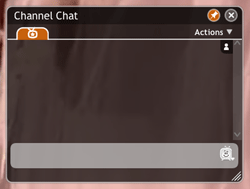 As already mentioned, Joost utilizes widgets to provide additional functionality, the most noticeable of which is a channel-based chat room. The idea is to allow viewers to talk to each other in real-time while watching the same channel. In testing there was rarely anybody watching the same channel as me, so it was hard to get a feel for how – as more users join – this will add to the Joost experience. As with the chatroom, any of the widgets (clock, news ticker, IM client etc) has the option of being ‘pinned’ to the screen so that is constantly available, even when watching full screen video.
Verdict
Joost is an impressive entry into the world of Internet TV. Its peer-to-peer technology not only lowers the cost of distribution for content owners, but also does it in a way that appears to solve the piracy problem. That said, picture quality could be better, and the license restrictions on content seriously impedes users (like me) who reside outside of the US. Overall, Joost is a welcome addition to the digital home, but I wouldn’t cancel your cable subscription just yet.

[…] top article on our launch day is a full review of Joost, the much hyped online TV service from the founders of Skype. last100 is also currently running a […]
[…] top article on our launch day is a full review of Joost, the much hyped online TV service from the founders of Skype. last100 is also currently running a […]
I am not a member of joost yet (no invite or friends), but from that screen shot I must say that it looks to be exactly how I expected it. I bet the quality will improve nonetheless. It is still looking like a great service.
FEEDBACK: When viewing in Firefox 2, the text for the above comments do not flow correctly. Other than that, things are looking good in this blog.
heya thefat!
go here and request for an invite today:
http://tv.coveragemag.com/news/unlimited-joost-invites-get-it-here-today/
joost is consider fairly good as long as you have a stable connection to the web. else, the jerkiness will put you off sometimes..
As a Joost user from outside the US, I think the choice of content leaves a lot to be desired. While some of the lower profile stuff looks interesting (Atlantis Sci-Fi, IndiFlix, the massive amount of music channels), there’s very little, if any, “mainstream” content.
National Geographic, Warner Bros and other “big name” content producers appear to be North America only, which I think will work against Joost in the short to medium term.
As for picture quality, it’s okay. Not great, but from a technical point of view, I’m impressed with it. I generally watch it (when I can be bothered to watch it at all) on my laptop on the kitchen table while I’m cooking in the kitchen, with a viewing distance of about 3-5 metres. Artefacts aren’t very noticeable and the stream is generally smooth.
I’m watching and waiting.
Hi, I am not I Joost user, but would like to get an invitation. Thank you… Interesting post
Well “open” is the right word, but joost has 2 advantages that the other online video or broadcasting sites/software don’t have, a stable p2p platform (backed up by a strong non-p2p network) and the licensing, the rest of the stuff is just like skype or kazza, its a mater of refining with time and experience, but those 2 are big advantages that no one is right now in a position to compete, i can see in the future, pay-per-views, exclusive channels (like the “friends” channel or “seinfeld” channel), so the future seems bright for joost.
As a side note, were i live, it’s way easier to get broadband internet than cable tv ^^
(ohh and a invite would be nice as well ^^)
Gimme gimme gimme!
[…] an in-depth review and guide to the site from steve […]
Yeah looks very interesting..i’m not going to cancel my cable package just yet but it certainly looks as if it’s the way forward – send me an invite please !
The content restriction for people living outside the US is annoying… but maybe that will change over time – I sure hope it will.
Wanted to try it for a long time. Signed up for beta on windows and mac platforms. Maybe they thought i was being a wise-guy.
What is available for non-US citizens ? I’m from France, is there any interest in Joost ? Are there French TV shows ?
PS: an invite would be great, thanks !
would you be so kind to give me an invitation?
Didn´t manage till now to gather one
regards
ShoX
Joost – Complete Review …
Here’s a complete look at the popular online TV service from the founders of Skype. Not only that, but if you haven’t already gotten one, you can get an invite from here.read more | digg story…
Please invite me to joost.
Thanks,
Ants
Invite to Joost? Thanks…
Please can you invite me to Joost ?
Many thanks !
Gabi.
By far the most exciting thing about Joost is the magnitude of it’s content partnerships. While there may be quality and UI issues, these can be improved over time. Until now, the most significant factor in hindering the growth of internet TV has been the fragmentation of content owners and therefore the inability of platforms to pull them together legally. Joost looks like it will be the first to be get this right.
Invite me, pretty please!!!
Great blog. Followed a link from R/WW.
Any chance of a Joost invite please? Cheers!
Pierre
Here’s another Joost review with more screenshots and a look at some of the content.
Seems like a very unique offering. I wonder what the business model will be in the future for it…
ps-any invites?
Can someone send me an invite?
Interesting story. I’d love an invite as well please
Invite me, pretty please.
I’ve been wanting to check joost out for some time now. I hope it provides enough quality content that i can tell the cable/sattelite providers to take a hike, get an hd antenna for local channels and call it a day. An invite would be terrific.
toby[at]fiercerobot[dot]com
Hi,
I’ve known about Joost for a while and would love an invite too!
Looks good, can’t wait to try it out.
Could I have an invite, please? Thanks!!
Just got here from Readwriteweb, looks interesting!
Additionally, i am also interested in an invite. Even if there is no Linux-client..
Looking forward to an invite
I would love an invite! Thanks!
Great site, found it via TC. I’d love an invite please.. adamrides at gmail dot com..
Thanks!
[…] Ein guter und ausführlicher Artikel von Steve über Joost und das “öffnen” ihrer Pforten – in englisch – ist hier zu finden “Joost ‘opens’ to the public – full review” […]
If only the programming were HD….[sigh]…may I have an invite to see?
Hey, i’d love an invite too. I’m from Australia and we have limited online video content available over here 🙁
Cheers!
Would like an invite please. Thanks.
Hi,
Could you please send me an invite to Joost? Thanks
Sreenu
I look forward to more from last100.com as the site grows. It’s great!
Please send me an invitation to the Joost beta site when you have a moment. Thanks.
Clemente Hernandez
Great review, would love an invite 🙂
Thanks!
I am not a member and would love an invite as well. The site is all the rage right now.
Thanks,
Jim
Please send me an invitation!! juan [at] crossengine [dot] com
Thanks!
Juan
[…] the last100 lifestyle/blog entails is to read specific posts. Some early/recent examples include: a review of Joost, the online TV service; a poll about Skype; and a short post on the Amazon DRM-free music download […]
Yeah,
I want to Joost please!
Thanks.
LD
Invite?
Thanks!
please send me invitation 🙂
terrific Review. R/R web is the only blog I read evryday and now this is really cool!
[…] the digital lifestyle” — sorta like what we’re trying to do here. Check out the post on Joost, the new online TV service from the founders of […]
Wow – good review. Even though I analysed these features, Way its been express in blog is good.
Looking forward to the potential of Joost. Would love an invite. Thanks
Very good article…If you want some invitations, enter your mail adress, give me your name and I give you an invitation to join me on Joost. (Sorry for my english, I am french 🙂 )
I did not specify, the informations must be send like a comment in this post :
http://www.sylvainratton.fr/blog/?p=256
Could you please send me an invitation.
Thanks!
Thanks. Could you please email an invite?
Could change the way the world watches tv…or could be a dud. Would like to check it out for myself.
Any chance I can get an invite?
Thanks,
Paul
Am I too late? Any invites left? If so thanks in advance.
Fang
I would like an invite, please !
I’m still dearly missing more foreign (particularly European) and non-English channels – this will be essential for becoming an international leader in the field. Still, would like an invite 🙂 THX!
invite? please. Thanks and I’m alreadu enjoying the new blog.
Congratulations on the launch of last 100! It’s now in my daily “must read” folder.
I would be grateful for a joost invite, as well.
Thanks, and keep up the great work!!!
i need an invite.
thanks.
I’d like an invite – pretty pretty please…
Thanks and cheers!
Congratulations to you guys (Last100) on your launch. I look forward to hearing your perspecives.
I would love an invite to Joost! I have been looking forward to testing this out for a long time!
RR
Yummy-yummy!! Been waiting for this one!! Can I please have an invite????
Thanks in advance, Donna
May I have an invite from you please?
thanks, mark
Interesting review. Could I please have an invite? Thanks!
Thanks for the invite! 🙂 🙂 🙂
I would love to get an invitation to try it out!
Many Thanks,
Stephan
Like the site specially ure coverage of mobile web/apps etc. Would love a chance to try out joost and would also be interested in hearing more of what you think about it.
Much thanks
Kez
Been waiting for this… If there are invites to hand out, I’d be interested;
thanks
I would be interested in being a beta tester. Thanks.
Hey- could I please have a joost invite? I’d love to check it out.
Thanks!
[…] En savoir plus Joost et last100 […]
Steve,
Thanks for the invite!
Chris
Would appreciate an invite.
I could do with a less-than-perfect picture. Jerkiness? No.
I would appreciate an invite…
Not sure to what extent Joost could pull me away from regular TV (and the stuff I get from the Internet anyway), but I would sure like to have a go and see. May I please have an invite? 🙂
It seems cable companies business model is runnnig out of time… but so far, the stock exchange hasn,t noticed yet
May I please have an invite? 🙂
I would realy like an invitation to test Joost !
Thanks
I’d like an invite please. Thanks!
I’d like an invite, please!
Thank you.
I wouldn’t mind an invite to Joost, if possible.
Thanks!
I’m catching up with the invites! Thanks for stopping by everyone 🙂
An invite would be great please. Like the new blog!
I’ve been wanting to try this out for some time. An invite would be amazing. Thanks for the informative overview.
Love the new blog… looking forward to more.
Would love a Joost invite, Steve… many thanks!
[…] že po nedávném navýšení kapitálu se jedná pouze o promyšlený marketingový trik. Zdroj: last100 22. 5. […]
Excited to see this new aspect of watching tv on the pc… I would love to get an invite please…thanks 🙂
Invite please 🙂
Could I have an invite too please?
I’ve tried to get an invite, with no luck. I’m excited about the steps, however miniscule, to combine the different mediums in a more synchronized way. So many freaking gadgets that don’t work together in any way. Hopefully, the tv and internet will do a complete merger sometime soon.
Hi, could I please have an invite?
Would you be so kind aand please pass along a Joost invite to me? I would love to try it out! Thanks in advance!
An invite would be much appreciated. Please send to pichot (at) andrews (dot) edu.
Thanks.
Could I have an invite too please?
Hi! great blog! Can I have an invite for Joost please? Thank you!!!!
Got the invite. Thanks a lot!
Wow, awesome. A lot of the reason I don’t watch regular TV is because I can’t plan my life around when a show’s going to be on.
Can I have an invite? Thanks much.
Wow great post, would definetly like to give it a whirl myself…
Can I please get an invite to joost? My email is chunkyace[at]gmail[dot]com
Thanks 🙂
[…] Source:last100 […]
Could I please have an invite?
Thanx.
Hi, could I please have an invite?
invite please!
100d’s of messages… hope to be lucky one!
seems great. wanna check it out for myself tho. so can i please get an invite
thanks
I’d love to get an invite if you have a spare. 🙂
I got the invite, thanks a lot!
Hi, I am not I Joost user, but would like to get an invitation. Thank you…
Can I have an invite please?
Thank you!
Pablo.
Can u grace me with an invite.. want to try it…
Can I have an invite please?
Thank you!
Dimitris
Hi! May I have an invite, please? Thanks.
Can I receive a joost invitation? mak2pac add hotmail dot com? Thanks!
Sounds great… would love to try it out. May I have an invite?
I’ve been hearing about Joost forever, it seems, and it looks very close to the least hype-filled accounts I’ve heard. An invite would be appreciated… and the new blog is great!
Got the invite. Thanks Steve!
Now onto test out this baby…
Got it! Thanks!
thats really great news…
looking forward for more of it….
and also for the invite
[…] Joost opens to everyone Nice review from Last100. I’ve been in the beta testing for a while. Choice is still limited and quality so-so. I’d buy choice over quality anyway, so no wonder I didn’t really fall in love with it. […]
Thanks for the invite. What a way to promote your blog! Too bad it missed the front page of digg 🙁
This is great news
Fortunately, what i expected.
Keep up the good work
could someone please send me an invite ?
thank you
Nikos
I’d love an invite to see what all the fuss is about.
Thanks
Please may i ask for an invite?
hi, I’d really appreciate an invite if possible. thanks.
jdbobyn (at) yahoo.com
May I also still request and Invite? Thank You
I would like an invite please, bryanttATdickinsonDOTedu
[…] managed to get a Joost invite from Last 100, giving me a chance to review what the fuss is all […]
What is the business model here? Advertising? Same as Skype?
Looks interesting indeed. My concerns are cost and security.
P2P technologies are notorious for distributing spam, spyware, trojan horses, keyloggers, etc. Just look at the bad track record of kaazaa, limewire, etc. I know somebody who used limewire and he got so much malware on his computer (despite all the antivirus, anti-spyware, firewalls, etc he had) the only way to fix it was to spend many hours reformatting the hard drive, reinstalling windows and installing & configuring all the different programs, minus limewire.
The joost site says it is free, but is that going to be permanent, or only during the beta phase? It says the P2P technology lowers the cost of distribution, so if it costs companies to distribute, then there must be a charge to cover that cost, no?
Over time, I hope that issues like these will be resolved and the service will gradually improve.
Send my an invitation please!
Hi, i would like an invite to Joost please.
The business model is a good question. Does it have ads on it? Will it be pay-per-view?
The main problem I see with these kind of internet TV services is that I also have to pay my ISP for the priviledge of paying for the content itself (or to watch the ads).
And all this, because ISPs do not seem to be willing to roll out well established technologies like IGMP to enable multicasting. Running IGMP proxies on their routers would reduce the bandwidth usage for ISPs drastically (as the traffic would only be duplicated when necessary, not at the source).
Perhaps we should look more to the router and networking hardware industry for the reasons why these technologies are not adapted.
So what is this? Video on demand? Or is it like normal cable TV?
Do you know what’s the minimum bandwidth needed to use this software properly?
Can I have an invite?
Hi,
Could you please send me an invite at masong11@aim.com?
Thanks!
Could I get an invite please?
Thanks in advance. 😀
I have been following development of Joost for a while, my main concern have always been picture quality and contents quality. I long for the days when atleast 700KB video streaming will become very basic. An invitation will be definitely appreciated.
I’d like an invite!
I’m wondering what speed connection is required to acheive acceptable viewing quality?
Oh, and can I get an invite to check it out myself?
Cheers
Aloha, may I have a JOOST invite please.
Mahalo Nui Loa (thank you very much),
Paul G. Hugel
Maui Scientific Analysis & Visualization of the Environment Program
http://nko.org
Joost invitation request. Thanks!
hello,
could you please send me a joost invite ?
thanks in advance.
the blog is great.
[…] a mere three hours viewing of Joost (the new online video service from the founders of Skype — see our review) would all but use up this monthly allowance, it’s clear that lots of Internet users aren’t […]
Excellent article !
I hear a lot about Joost services for a while but not being able to connect, it is always hard to figure out features…
I would like very much to test and run Joost from my WiFi Archos PMP..please send an invite.
Thx.
can i have an invite please
Joost definitely seems to be a step in the right direction and the future of internet tv seems promising. While I’d love to try it out, based on another of you’re articles (http://www.last100.com/2007/05/28/will-isps-spoil-the-online-video-party/) I’m a bit apprehensive as to what my ISP will do if I start joosting away. That said, can you please spare an invitation to quench my curiosity? I’ll let you know if my ISP (Time Warner Cable in San Diego, CA) flips out.
about time, too bad Australia has slow speeds and capped plans!
may I have an invite also please
[…] peer-to-peer online video service founded by Italian billionaire Silvio Scaglia, which like Joost (see last100 review), aims to combine the “lean-back experience” of television with the interactivity and […]
I’m interested to see if Joost works on a Mac over a DSL connection… between the two something’s gotta go wrong. 🙂
All that region restriction is easily solved by renting a box in the US and bouncing through it for Joost access 😉
Too bad that’s out of reach for the average joe.
Can I get an invite please?
[…] billing itself as a Joost-killer, VeohTV is a peer-to-peer online video application that, like Joost (and recently launched rival, Babelgum), runs in fullscreen mode so as to give a more TV-like […]
[…] in the week Joost, the online TV service from the founders of Skype (see our review), appointed a new CEO — ex-Cisco executive Mike Volpi. Considered by the tech industry as a […]
[…] Our verdict: Joost is an impressive entry into the world of Internet TV. Its peer-to-peer technology not only lowers the cost of distribution for content owners, but also does it in a way that appears to solve the piracy problem. That said, picture quality could be better, and the license restrictions on content seriously impedes users who reside outside of the US. […]
[…] Our verdict: Joost is an impressive entry into the world of Internet TV. Its peer-to-peer technology not only lowers the cost of distribution for content owners, but also does it in a way that appears to solve the piracy problem. That said, picture quality could be better, and the license restrictions on content seriously impedes users who reside outside of the US. […]
[…] Our verdict: Joost is an impressive entry into the world of Internet TV. Its peer-to-peer technology not only lowers the cost of distribution for content owners, but also does it in a way that appears to solve the piracy problem. That said, picture quality could be better, and the license restrictions on content seriously impedes users who reside outside of the US. […]
[…] Joost co-founder, Niklas Zennström, has revealed that the Internet TV service now has one million Beta testers, and is on track to fully launch by the end of the year. Speaking at a Skype press event, Zennström also acknowledged the challenge of scaling the peer-to-peer video platform, and stressed that the company’s main priority was ease-of-use. […]
[…] Internetová televize, které slibuje propojit to nejlepší z obou světů, otevřela své brány pro širokou veřejnost. Záleží na úhlu pohledu. Na webu Joostu zatím žádný registrační formulář nenajdete. Beta testeři ale dostali neomezený počet pozvánek, zdá se tedy, že po nedávném navýšení kapitálu se jedná pouze o promyšlený marketingový trik. Zdroj: last100 […]
[…] IPTV provider) are teaming up to launch Next.TV, a P2P-based Internet TV service not dissimilar to Joost, Babelgum and — to a lesser extent — […]
[…] me thinking about whether the future of “full screen” Internet TV applications, such as Joost or Babelgum, reside on a PC or, instead, some sort of set-top-box which connects to a […]
[…] a much better option, and for full-screen streaming video via a desktop application, the likes of Joost, Babelgum or VeohTV offer a much richer experience. And for everything else in between, a web […]
[…] me thinking about whether the future of “full screen” Internet TV applications, such as Joost or Babelgum, reside on a PC or, instead, some sort of set-top-box which connects to a […]
[…] me thinking about whether the future of “full screen” Internet TV applications, such as Joost or Babelgum, reside on a PC or, instead, some sort of set-top-box which connects to a […]
[…] reports that Joost is to add “live television” to its p2p-based Internet TV service. Content strategy and […]
[…] Hulu and the catch-up service, NBC Direct, complemented by desktop Internet TV applications such Joost and Babelgum (again, both ad-supported), as well as video aggregators such as VeohTV. Perhaps […]
[…] net, meaning that it competes more with Zattoo, as apposed to other Internet TV startups such as Joost or Babelgum, both of whom offer an on-demand experience. It’s also clear — based on […]