
Ryan is a UK-based IT consultant and blogs regularly on digital content.
 After much frustration, I finally received my iPlayer beta log-in details late last Friday. This allowed me to access the walled area of the BBC website that contains the mythical iPlayer. So, after a week of testing, here’s what I experienced, and, finally, what I think of the iPlayer.
The first thing I should mention is that there maybe some confusion between the iPlayer beta login details and the bbc.co.uk membership details. The former just allows you to have access to the beta area where you can download the iPlayer Library application, whereas the latter allows you to log in to the iPlayer, the iPlayer forums and also other areas of the BBC site. Which set of credentials you need to enter at each stage is not made particularly clear. I assume that when the beta ends, only the bbc.co.uk username and password will be needed.
Installation
Downloading the Library application should have been more straightforward — you need to first visit the online program guide in your web browser and then try to download a program! Offering a direct link to the download first, and then redirecting you to the program guide afterwards, would have made a lot more sense.
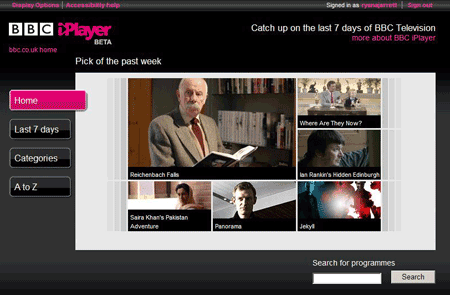
I use Firefox as my primary web browser, which worked fine when looking through the iPlayer guide. However, when I tried to request a download, I was told that my system only met two of the three requirements (Windows XP and Windows Media Player 11), and that I needed to use Internet Explorer. I tried using IETab in Firefox but the website still refused to co-operate. I begrudgingly switched to Internet Explorer 7 and I was finally offered the iPlayer Library download.
Once the Library had finished downloading, I ran the executable and it installed happily enough. However, it was unstable until I uninstalled all other Kontiki-based applications i.e. 4oD and Sky Anytime. [Ed. Kontiki is the peer-to-peer technology that powers a number of video download services, which now includes iPlayer]. I’m not sure if this was a peculiarity of my system or a general problem with the iPlayer, however, other people have reported similar problems when using the application with 4oD installed.
The Program Guide
The program guide lets you browse a selection of programs broadcast in the last 7 days and then choose what to download to your machine. The guide has three sections:
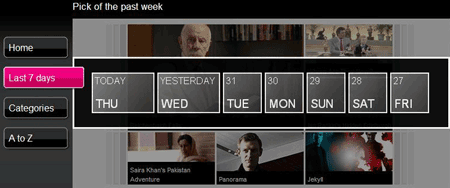
Last 7 days — this lets you view which programs were broadcast on a particular day in the last week. These views are then conveniently broken down into Morning, Afternoon and Evening.
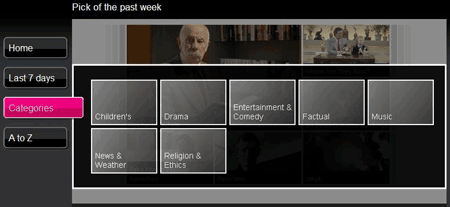
Categories — this places all programs into one of 7 categories: Children’s, Drama, Entertainment & Comedy, Factual, Music, News & Weather and Religion & Ethics. The resulting list of programs can then be sorted by most recently transmitted or alphabetically.
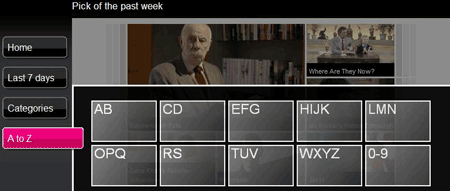
A to Z — this option gives an alphabetical directory of all programs on offer.
As well as the three options above, there is also a search box, which I suspect will be the most direct way to find a program if you already know what you want to download.
Downloading a Program
After choosing a program to be downloaded, an entry appeared in my Library showing the size of the download and the percentage complete. Programs downloaded can be stored for 30 days, but the DRM will delete the download 7 days after the first viewing.
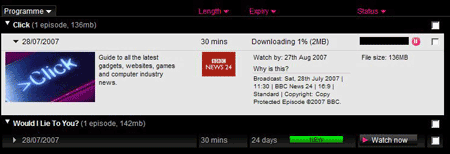
I decided to download BBC News 24’s computing and technology program, Click. I found it in the program guide using the search box, clicked on the Download link and sure enough it appeared in my Library. The download started almost immediately and took about 20 minutes to complete, and I was informed by a popup alert in the bottom-right of my screen when it had finished. The 30 minute program was 136MB in size.
Viewing a Program
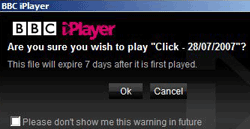 To view a downloaded program it was just a matter of clicking on the “Watch Now” button. An “Are you sure?” box popped up to confirm, because the 7 days viewing window starts ticking from the moment the first frame is played.
After clicking through the dialog box, another window pops up. This is the “viewing” window, which contains an embedded Windows Media Player and the program information.
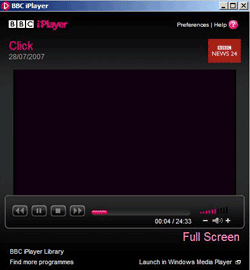 On some programmes there are also options to turn subtitles on and off, which I thought was a nice touch as I haven’t see subtitles implemented on any other internet TV applications. You can put the video into full screen mode, or, if you wish, open it in Windows Media Player separately.
The picture quality was OK, but I have noticed it varies from program to program. Doctor Who suffered less from being expanded into full screen mode, but the file size reflected this. It will be interesting to see how this payoff between quality and file size will pan out, certainly in the short term, or will the BBC always offer more prominent programs at a higher image quality?
Conclusion
Overall, I quite like the iPlayer application. At first it seems a little awkward using the website to choose programs, but I understand that it gives a more universal interface and reduces on the size of the iPlayer application. However, having to use Internet Explorer is annoying and hopefully support for Firefox and other browsers will follow.
At the end of the day, it’s the volume and quality of the content that makes the iPlayer special. With the possibility of live and on-demand streaming, and access to archive programs in the future, I believe the iPlayer will lead rather than follow. There are still lots of questions regarding the use of DRM and portability of the videos, the availability on other platforms, and the restrictive use of Microsoft products — issues which have already been covered here on last100 and elsewhere.
On my personal wish-list of features is the ability to subscribe to a series, much like a podcast, and have the next episode download automatically when available. I’d also like it if the DRM kicked in only after a certain amount of playing time has been reached, maybe 30 seconds, in case I accidentally start a program.
Also see: Five UK Internet TV offerings compared

Sounds pretty cool. I wonder if the iPlayer will be available outside of the UK?
I hope it will, in some form, but the licensing issues are complex. Maybe an ad-supported version for some of its programs will be available, but I don’t think a service as fully featured as the UK iPlayer will ever be available overseas. From what I understand, they make a considerable amount of money licensing their programs in other territories, plus significant DVD sales revenue – certainly in the short- and medium-term they wouldn’t want to harm this. However I dare say that in the long-term these sorts of issues will soften and more homogeneous products will be available worldwide.
Greeeaaat!
This sounds even worse than the stories already published about the iPlayer. Not only is it proprietary, DRM filled and against the mandate of the BBC itself, not only are you forced to use Windows, you are also forced to download IE7, Windows Media Player and several sets of other commercial applications? What a nightmare!
And now to realise that it only will work in the UK? WTF?
I am an English citizen, I use a Macintosh and I don’t live in the UK. Even if I used Windows or wanted to use my wife’s Windows laptop or something, I sure would not download all that commercial junk just to watch Dr. Who. And people wonder why illegal downloading continues?
All of this content has been paid for already by the British public. The idea that I can’t see it because I refuse to buy into Microsoft’s crap software is outrageous.
I have access to this beta as of a couple of days ago but I can’t use it at all, as I use Ubuntu. This frustrates me, especially because this software has been in production for a number of years and I have been looking forward to using it, but also because I pay my license fee like the rest and can’t access a service my money, and other users’s money whom are excluded from usage because of their respective operating system choices, has been spent on creating. And I can’t see why its only compatible with Windows XP, not even the latest Windows.
There are 3 things about the iPlayer that I have noticed
1) The programs are automatically recorded off the telly and therefore have some bits before and after the program. I downloaded “The Real Hustle” and there was 10 mins of the programme before at the beginning and 10 mins of the programme after at the end. Come on BBC, surely YOU have access to the original video files, and don’t therefore have to record them off of your own channel!
2) The Konitiki software is a constant irritation, because it is always running. There is a Konitiki process called KService.exe that annoys me. I play online games. When my ping is around 150, I don’t go and hack my internets to try and fix it. I don’t have a problem with high pings. Usually. But when KService makes my ping go from 14ms to 590ms, then I get annoyed. Now, every time I want to play an online game, I have to press Ctrl-Alt-Delete, and Kill KService.exe
3) It’s not avaliable on Macs. I don’t care about Linux, and frankly I don’t think they should port it to Linux, since the number of people who SOLEY use Linux is minimal. The number of people who soley use Macs is much greater, and is viable for a Mac port. The BBC Trust, however, has forced the BBC to port it to both the Mac and Linux, and the Mac port will be released in the Autumn, with the Linux version by the end of the year
The idea of the iPlayer is superb. Now I wish it was implemented correctly
How depressing! I may as well just mail some of my (heard-earned) money off to Micro$oft.
Adam:
You may not care about Linux support, I do, also, I care about Mac support, even if I don’t own a Mac. By your logic the 3% Mac population doesn’t deserve a port eather, since the number of people with only a Mac in their house is really small (you included).
David
Adam, simply set the Kontiki service to MANUAL in services.msc, and disable any khost.exe entries in msconfig, then you only have to CAD after actually using the program. And I don’t think it SHOULD be available outside the UK, I pay a hefty licence fee annually for the privilege of using this program 🙂
I wish commentators would stop complaining about the iPlayer not being available for Linux resulting in them not being able to get “the full BBC experience”. The truth is, it is not viable to port it just for the minority of people who use Linux (in the UK Joe Average hasn’t even heard of Linux, the only reason that it’s getting so much attention is because a large number of Bloggers, Diggers etc. are not Joe Average when it comes to computing)
To get the full BBC experience you need the right equipment like Windows (Mac soon), a colour TV, a digital reciever etc. Not everyone has all these but I rarely see someone who doesn’t have Sky digital/Cable digital/Freeview complaining.
I tried the iPlayer out and found much of the same frustrations as you have, the quality of the video you are provided with is somewhat poor I thought. To give the BBC credit though, the iPlayer simply would have never been possible without DRM and they have to be creditied with at very least making an attempt to making all their content available online and some people will no doubt find this service useful once they have managed to set it up.
Joe, you are a cock. That’s like saying that the ‘UK Joe Average’ (?) isn’t deaf, so why bother adding subtitles.
Of course there are technical limitations, I can’t get TV on my radio (duh!), but this is like saying only Sony TV’s will be able to show BBC content, not Toshibas or Samsungs… the BBC just wouldn’t get away with it.
It’s not it’s not possible to do this on Linux, it’s just that the BBC have made some very bad technical decisions that have resulted in alienating a portion of it’s paying customers and denying them a service, which is not only bad practice but I believe illegal for them to do under their own charter.
…oops, meant Rob not Joe, you’re still wrong though 😉
Rob: I know you think that everyone uses windows and shows as little wit as you, trust me – some of us don’t: Calling Microsoft “The right equipment” is disingenuous at best. I wonder if other things were marketed as effectively as MS which brand of beans you would find yourself disgustingly loyal to.
I use Ubuntu Linux (and many other LICENSE PAYING CUSTOMERS do too) which means that I can’t use this monstrosity. I’m most unhappy that a portion of my license fee seems to have found it’s way to Redmond, though not surprised.
Neil: The internet is amazing piece of work – accessible through many different platforms: DRM kills this – it just doesn’t work. People who are unable to use the legal services because of DRM will inevitably turn to the shadier methods of media acquisition. This will bolster the ‘illegal’ services by filling their pockets with advertising cash, filling up file-sharing networks with seeds/peers and providing money for physical bootleg media. The BBC programmes are broadcast on terrestrial media – but I don’t see anyone screaming about sharing old VHS cassettes or DVD-RW.
Kylde: fair point – though we’ve already paid for it, i personally don’t have a problem with people oversees reaping the benefit of that. The beeb could be a great ambassador for us, and already is with much of it’s programming, like the world service.
Adam: precisely. A cock. Indeed.
I will never watch the BBC again, I hope they go under, they don’t deserve to survive. Alas, they were a shining example, now they’re just a burning train wreck.
At least you could get it to work! I could login through Firefox however when i tried to login through IE it just kept loading the same page. Seems the BBC have a long way to go to get it right.
If the DRM is such a nuisance to you, check out this flash video;
http://www.fusenn.com/movies/bbciplayer.html
good old, delays and limitations that in the end are completely pointless
Fusen: hahahaaaa!!!!!! that simple. kudos.
“I will never watch the BBC again, I hope they go under, they don’t deserve to survive. Alas, they were a shining example, now they’re just a burning train wreck.”
what a drama queen. i’m really fed up of whiny spoilt noobs you get on the net these days who always want everything now & for free, the false sense of entitlement these people have is nauseating.
how many times do people have to be told that THIS IS A BETA. they pushed out a beta version for the most popular platform so it can be tested quickly & fully. mac & linux versions will be coming out at the end of the year.
@jo
I agree that never watching the BBC again is overreacting but at the same time they’ve had years to sort out a cross platform strategy, and I’m very skeptical that they’ll have a Mac or Linux version by the end of the year. I hope I’m wrong.
I have to say, I reviewed the BBC iPlayer beta and hated it. Forget about the DRM limitations, which another commenter rightly pointed out don’t need to be there, but the application itself was a mess. Unstable and not a single ounce of thought had gone into usability and interface design, they obviously thought it was more important to make everything shiny. Not to mention the confusing DRM restrictions they’ve decided on.
Jo: Spoilt: not at all.
Noob: speak for yourself.
Whiny? Yes, thanks for noticing.
I don’t want it for free – check this: I Already paid. My real problem is with drm, and my sense of entitlement is far from false, again: I, along with everyone else in the U.K. who has a television, paid for this.
As for Drama Queen, check out the spelling and grammar on the bbc website, the quality of the news that they are peddling these days and the attitude of the administration.
People will obtain the media any way they can – it’s a fact, suck it up princess. I have no problem paying for the media I enjoy, but when paying for it becomes more difficult and tedious, nay, even dangerous (a la sony rootkit) than using less legal alternatives, people will do the obvious.
I loved the beeb, but it has gone downhill, though I guess I’ll try harder to control my diatribe, as some people don’t have a sarcasm detector (must not be compatible with windows).
There are 3 things about the iPlayer that I have noticed
1) The programs are automatically recorded off the telly and therefore have some bits before and after the program. I downloaded “The Real Hustle” and there was 10 mins of the programme before at the beginning and 10 mins of the programme after at the end. Come on BBC, surely YOU have access to the original video files, and don't therefore have to record them off of your own channel!
2) The Konitiki software is a constant irritation, because it is always running. There is a Konitiki process called KService.exe that annoys me. I play online games. When my ping is around 150, I don't go and hack my internets to try and fix it. I don't have a problem with high pings. Usually. But when KService makes my ping go from 14ms to 590ms, then I get annoyed. Now, every time I want to play an online game, I have to press Ctrl-Alt-Delete, and Kill KService.exe
3) It's not avaliable on Macs. I don't care about Linux, and frankly I don't think they should port it to Linux, since the number of people who SOLEY use Linux is minimal. The number of people who soley use Macs is much greater, and is viable for a Mac port. The BBC Trust, however, has forced the BBC to port it to both the Mac and Linux, and the Mac port will be released in the Autumn, with the Linux version by the end of the year
The idea of the iPlayer is superb. Now I wish it was implemented correctly
Estou em processo a perda de peso a um pós parto e também todo mundo sabe quanto é difícil.
Incredible wealth of knowledge, if all her theories are verifiable she very well may have cracked an age
old anthropological puzzle. – Click Here Top 10 Home Remedies For Skin Whitening Forever Naturally & 3 Highly Recommended Kojic Acid Soap.
It is a no-nonsense guide which clearly directs you how to achieve lighter and whiter skin.
Fortuitously for you however, you do not have to stop your beagle from
barking, you just have to maintain it under management.
Starting in 2013, status akin to Nevada , Delaware and New Jersey have legalized and regulated online poker and each have sites exclusively for
in-state play.
Titan Poker offre à ses nouveaux joueurs, pour tout premier
dépôt, un bonus de a hundred and fifty% allant jusqu’à 600 $.
La salle de poker de Titan Poker est épurée et sophistiquée
et ça vous fait vous sentir grands!
Les joueurs suisses qui se connectent à un website de
poker en ligne que nous recommandons ont la possibilité de s’affronter dans le cadre de n’importe
quel tournoi open.
All it’s a must to do is play actual money cash cash games and every
five minutes you’ll be informed if you get any cash drops through chat
window.
The system automates the gathering, distribution and evaluation of intuitively Internet
content material, offering the consumer to browse
the community and locate pages of curiosity with a single click, after completion of an preliminary registration the place the person identifies their areas of curiosity and different preferences.
Take pleasure in Poker games like Texas Holdem, Omaha, 7 Card Stud and all conventional Poker games in Mansion Poker
Online Poker Rooms.
Nous basons notre avis sur un certain nombre de critères et cela inclut la part de la caisse, les bonus de on line casino gratuit,
la gamme de jeux, y compris le nombre et la qualité
des jeux de machines à sous, et bien plus encore.
Les sites de poker en ligne apportent aux joueurs une grande satisfaction tant pour son accessibilité
que pour l’opportunité qu’ils proposent aux débutants d’apprendre le poker
en quelques heures.
C’est une jeune et jolie joueuse de poker espagnole,
Ana Marquez, qui a réussi à terminer le jour four du PokerStars Carribean Journey en chipleader avec devant elle un formidable stack de 3.805.000 jetons, devançant de peu le fameux joueur Chris Moneymaker.
Google+ (pronounced and written, Google Plus, abbreviated as G + and in some Spanish-talking nations
pronounced Google Plus) is a social community operated by Google Inc.
Tous les websites qui sauvegardent les mains
sur le disque dur du joueur vous permettent de fait d’enregistrer vos mains
et donc de les analyser through un logiciel assistant poker de kind tracker.
All values of chips, and thus all video games, are performed
using fractions of bitcoins.
Our poker web site critiques on are in depth and goal, sighting both the positive and detrimental aspects of every website
based mostly on their particular person merits. We provide comprehensive
reviews of one of the best poker sites for US gamers on line and
have specifically partnered with a lot of 2016’s finest online
poker sites to convey our guests bonuses and freerolls that are unique to In addition to our unique
on-line poker actual cash US promotions, our top poker site reviews also cowl the important elements of gambling
at online poker sites corresponding to poker games variety, competitors levels, personalized ratings, bonuses, banking
choices and foreign money, private opinions and far more. And for data extra native to you, try our States pages.
Recreation variation is honest and incorporates a lineup of
most of the customary video games on at present’s poker sites.
Free Video games and Free rolls – One factor to look out for
when taking part in at any of our websites is whether or not the location in question provides you
the power to play poker totally free or participate in free roll tournaments.
Les jeux sont disponibles à partir de quelques centimes, y compris les tournois et les satellites.
Equally, Canadian poker players and Australian poker players will also be able to discover sites listed here that
cater particularly to them.
There are four network owned skins, two of which are available to US players: BetOnline and Sportsbetting New players can obtain a 200% preliminary
deposit bonus (As much as $1,000; ie. deposit $100, get $200 free).
bbc ireview doesn’t work everywhere,just in the UK
Interesting post! I really amazed to read the great information. You have shared best quality stuff in the content of the post. thank you so much for such an awesome blog post!
Also Check My Website
Hal pertama yang harus saya sebutkan adalah mungkin ada beberapa kebingungan antara detail login beta iPlayer dan detail keanggotaan slot deposit pulsa. Yang pertama hanya memungkinkan Anda untuk memiliki akses ke area beta di mana Anda dapat mengunduh aplikasi Perpustakaan iPlayer