
 When Real Networks announced the next version of RealPlayer at last month’s D: All Things Digital Conference, I described it as wanting to be like ‘Tivo’ for the web, in reference to the media player’s new flagship feature: one-click downloading and saving of online video. However, with the application only available to beta testers, it wasn’t untill last week that I actually got my hands on the software (currently Windows-only), courtesy of an invite from NewTeeVee.
Installation
 Those of you who are long time RealPlayer users will no doubt have suffered from the application’s tendency to take over almost all of a PC’s media play-back duties, including non-RealPlayer file-types such as mp3 or .mov, even if they were already being handled by another application e.g. iTunes. In addition, Real made it far too difficult to locate the free version of its player, resulting in many users holding the company in very low regard.
Recognising this, version 11 has a much cleaner and less cumbersome installation process that offers a tick box asking which media-types you want associated with the application, along with the option to disable the new video download feature.
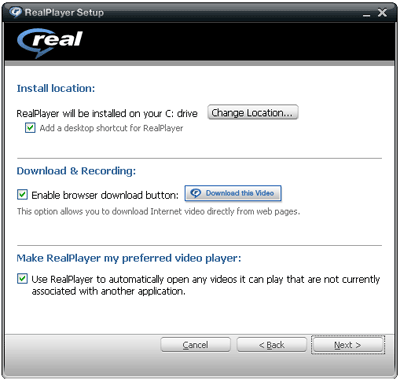
RealPlayer 11 will be available in two flavors: a free option which is limited to CD-burning, and a paid-for option that enables you to burn to DVD. Let’s hope that Real has learnt its lesson and will display the free version alongside the paid-for version, rather than being buried somewhere else on the company’s website.
Interestingly, Google Toolbar is also offered as part of RealPlayer’s installation, although I’m unsure if this is a new or existing partnership between the two companies.
Interface
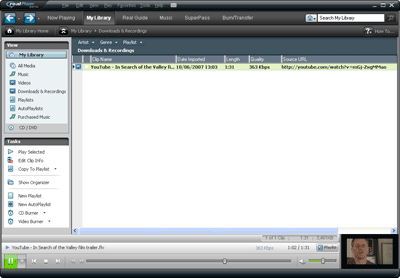
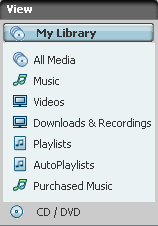 The first thing you’ll notice about the new RealPlayer interface is how similar it is to iTunes. Down the left-hand side are buttons for ‘My Library’ containing filters for music, videos, downloads and recordings, playlists and auto-playlists, purchased music, and CD/DVD. The right-hand pane displays a column view of your content, and at the bottom are the player controls. Additionally, when playing video from your library, buttons appear giving you the option to zoom-in or switch to full-screen mode.
I’d be the first to argue that there’s nothing wrong with borrowing from Apple’s UI, and that the result of which is that anybody familiar with iTunes will be right at home with RealPlayer 11.
Features
RealPlayer 11 also shares many features with iTunes, starting with its ‘jukebox’ functionality which enables you to import and organise music and videos, including adding meta-data and creating playlists. Additionally, like iTunes, media can be burned to CD/DVD from within the application itself.
 As already mentioned, the biggest new feature is the ability to download videos from the web . With RealPlayer 11 installed, when you visit a website with embedded video (Real, Flash, QuickTime or Windows Media), a floating tab appears giving you the option to download the file or ‘record’ it in the case of a live stream. Once you click ‘download this video’ a copy is then placed into your RealPlayer library. I tested the feature on YouTube and found that videos downloaded quickly and without a glitch. Next up I tried to save a ‘Real video’ stream from the BBC but was greeted with the following message: ‘This clip is not downloadable from this site.’ That’s because RealPlayer honours any online video protected by DRM, preventing a user from saving it to their hardrive.

As well as downloading, the option to share the video link via email is also available. This should help Real persuade content owners that its new player has the potential to send traffic back to the originating site.
As with previous versions, the new player has buttons to access Real’s content portal, music download and subscription service, as well as log you into ‘Super Pass’ (Real’s premium paid-for content offering).
Verdict
While it will be hard for RealPlayer to shake off its poor reputation, there’s much to like about version 11. The new interface and jukebox functionality has been appropriately borrowed from iTunes, and the ability to download and save videos from the web, not only works well, but should prove popular with users who want to build their own personal video collection. Having said that, it seems a bit old-hat to only give the option to burn media to a CD or DVD and not covert it for transfer to a portable media player such as an iPod. (Update: Real’s Matt Spragins left a comment telling us that this feature will be present in the final release.)
However, as we’ve previously noted, the legality of RealPlayer’s new download feature could be tested once it’s released, as it potentially breaks the Terms of Service of sites like YouTube.

Not really sure why Real are still bothering with real player. for me – Im never installing realplayer again. Since the late 90’s they stuffed up real player with all the ads etc, and that remained for many years now they are realizing that no one wants ads, and are changing it to focus on their content. Personally – Im not switching back – there are 100 different other media players and Real for me has lost it, and wont be coming back for many years to come. Its a shocking media player!
@Sherif
I hear you! Having said that, the download feature and iTunes-like jukebox library works well. But if you have no need for these features, fair enough. 🙂
This is Matt Spragins, Dir of Product at Real.
We will have the ability to transfer to a portable device (iPod) before the end of the year. Our CEO, Rob Glaser, did a demo at All Things Digital where he transferred a YouTube clip to an iPod. The feature is not in the upcoming beta but will be in a subsequent beta release.
Take a look at our RealPlayer blog for more info on upcoming features.
http://www.realplayer.com/blog/
Nice review!
Sorry, I’m done with the RealPlayer. It’s just too little too late.
download realplayer 11 full freeware
Realplayer!? give me a break!!
Did it take them all these years to realize how bad their player was!?
dowsload realplayer 11
thank uuuuuuuuuuuu very much
ummmmm, actually i jst download it right now..
the previous 1 waz better than this 1.. :S
thank thank
thnx
you can use real player alternative or real player enterprise for cleaner UI and less resource. and browser add-ons to download video files and replay av to capture ALL streams.
Give it a chance i must admit it’s way better than before and worth the download.
I agree i actually loved using it. It’s way improved.
” Try it”.
its good real player 11 i like real
its an amazin software
Matt, i have to admit i was pretty turned off by real under the old software [realone player?], and most of the rep that real has is justified. after hearing that rp10 was a decent alternative to itunes, i was happy that i downloaded and installed it. now i use rp exclusively to get music on [and off] my ipod, thankful that i never have to deal with apple’s crap software again. in an interesting twist of irony, they’re becoming the new real [haha!] with their bloatware that still doesn’t do the most basic of operations.
i think i might try rp11, altho i don’t really have much need for downloading online videos. if i can just add one last criticism, every single time i’ve installed real software, i’ve used the email “mandatory.registration@sucks.com” because…well, mandatory registration sucks =) hopefully rp11 will be different. in the meantime keep up the good work and THANK YOU for giving me an alternative to itunes.
hello!!!!!!!!!! idownload over 10 version of real player it dosent work
thanksssss
thankssssssssssssssssssssssssssssssss
bbbbbbbbbbbbbbbbbbbbbbb
how can i download realplaye11 for free?? pleaaaaaaaaaaaz i’m so so so so so so interrested 10x for all
let me down load realplayer 11 and see it
thanks a lot, you know thanks you not enogh but thanks 100 times
its a good programm and must be downloaded on all computers
I love Real Player 11 (Build 6.0.14.748), there’s no more intrusive ad-ware, easily loading. The most feature that i lyk is capable recording/downloading video file from Internet easily, no need special knowledge to operate this, even my 6 y.o. son can do it. 😀 Very nice application to play video files. But for audio files i prefer to choose Winamp 5.5 as default player.
Worth to try, Go RealPlayer!!
thx
i tested this recorder using ie and firefox browser and it works fine but with opera it doesnt work..how come?
03219101672
very nice
i have a problemn in the real player . when i open youtube.com not make down load
RealPlayer 11 is awful! It is not worth the aggravation. Videos are stop and go and are always getting hung up. Web browser is ALWAYS crashing with Realplayer11. It just doesn’t work.
This is gud if u will comparison with latest one
ohhhhhhhhhhhhh gr88888888
I’ve been so burned by realplayer in past years, they’d literally have to pay me to try their newest version. There are so many free players, there’s literally no reason to even try this. Especially for music, MediaMonkey spanks everything else.
HEY,I GOT THE PAID REALPLAYER SO I COULD BURN SO MUSIC, THE MUSIC BURNED BUT NO SOUND, ANYONE HELP ME PLEASE. JOE
HEY,I GOT THE PAID REALPLAYER SO I COULD BURN SO MUSIC, THE MUSIC BURNED BUT NO SOUND, ANYONE HELP ME PLEASE.
The Download video feature is interesting and the iPod transfer will be even better. I think I will start using real player again.
dowsload realplayer 11
this this is the beeeeeeeeeeeeeeeeeeeeeeeeeeeeeeeeeeeeeeeeeeeeeeeeeeeeeeeeeeeeeeeeeeeeeeeeeeeeeeeeeeeeeeeeeeeeeest software i have ever used iam an software engineer in microsoft international company my e-mail id is vivekabbabr7@yahoo.com
when i recorded the video and save in my mobile phone only sound plays please help me anyone
Menyadari hal ini, versi slot deposit pulsa memiliki proses instalasi yang jauh lebih bersih dan tidak rumit yang menawarkan kotak centang yang menanyakan jenis media yang ingin Anda kaitkan dengan aplikasi tersebut, bersama dengan opsi untuk menonaktifkan fitur pengunduhan video baru.