
 A few minutes ago an email dropped into my in-box from YouTubeDesktop.com — a product that I’d never heard of before — inviting me to try out their private beta. Claiming to be “something special”, that many developers had said was “programmatically impossible”, I willingly put down my coffee and fired up Firefox.
The idea behind YouTube Desktop is to bring a desktop application experience to navigating and viewing YouTube videos through a web browser.
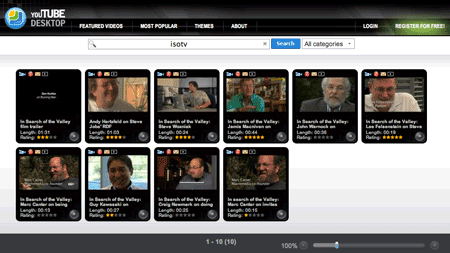
Windows can be dragged, resized, minimized in a tray, and videos can be dragged ‘n’ dropped between players and results. Key features include the ability to create playlists — again via drag ‘n’ drop — share video links with friends, and perhaps controversially, download and save YouTube videos to your PC — avi, mp4, mov, 3gp, wmv, flv, exe, “all converted on the fly”.
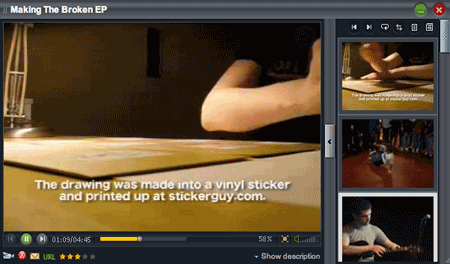
The end result, say the developers, is that YouTube Desktop provides a more convenient and easier way of browsing through the enormous amount of content available on YouTube.
Two areas where YouTube Desktop may run into legal trouble, however, is with their name — which could cause trademark issues — and the way the site enables users to save YouTube videos to their PC. With regards to the latter, as we’ve previously noted, many video sharing sites, including YouTube, have terms and conditions that may prohibit third parties from offering such a service.
Verdict
There’s no doubt that YouTube Desktop is impressive technically, with some complex AJAX going on under the hood, which worked flawlessly in Firefox on a Mac (I haven’t yet taken the time to try out the site on other platforms and browsers). Also, by using a desktop metaphor, the application is incredibly easy to grasp because you feel right at home dragging ‘n’ dropping videos into a playlist or minimizing and resizing windows on the fly. Whether or not this makes YouTube Desktop more efficient at navigating the enormous amount of content on YouTube, I’m not so sure, as you’re still left with categories and a search box as your primary means of locating videos. Having said that, the site’s UI does feel a lot less cluttered than YouTube itself.

Hi Guys,
Wow, we didn’t expect such a fast response !
So what we are going to do is let the first 101 emails into the PRIVATE BETA. Please add “YES PLEASE” in the subject so we can deal with the responses quicker.
Only email us if you can ACTIVELY take part.
Hurry up before it’s too late.
Regards
YouTube Desktop Team
e : support@youtubedesktop.com
w : http://www.youtubedesktop.com
This looks pretty cool…can’t wait to try it out.
Seems pretty cool. Definetly need a better way to surf YouTube.
And of course the obvious “robbing advertising impressions and thus money from YouTube while sucking up bandwidth” problem. Any counter for that?
Yes Please!!! Let me get an invite!!!
The username is tester
The password is testing
I’m in!
Wow..thatz a great idea. I love this player. Will post an article soon on my blog. Thanks for the info.
Tech Thoughts
Yes please! If you don’t know my email, it’s:
shaderone.jd@gmail.com
This is 100% fake.
YES PLEASE
What the hell!!! its asking me for a username and password.100% fake ,if its even for real dont you think youtube will keep quiet.
I would love an invite!
Thanks!
YES PLEASE
YES PLEASE
i want to join the beta
YES PLEASE!
Mo Beta!
Would love to check this out and write it up
Hmm interesting concept! The whole world is adopting Youtube.
Kind of reminds of veoh tv but a little better though
so what’s their point? to be bought by youtube or to be hired as Interaction Designers or maybe developers? I mean, they have just done a re-design of youtube. It’s as if I do my own design of apple.com and tell people to go to my site to check for apple products, instead of going to the official one, just because mine looks cooler.
silly
PS: technically cool, but practically useless.
YES PLEASE!
MadCat is a multipurpose application that allows you to browse the web, while enjoying quality video content from around the world. MadCat can download you’re favorite Rss feeds, Democracy channels, or sniff media links out the webpages you browse.
http://www.getmadcat.com
Please!!! Let me get an invite!!!
Yes please
Does it enable use of remote controller? Youtube is great when you sit in front of a computer but if you want to watch some videos on a big LCD from your couch then it is another story.
Please let me test.
Thanks
Bobb
sounds great. Would love to try this out please send me the login info pradeepm@techie.com
I’d like to see this in action, sign me up for the Beta……
Veilen : Remote control support is indeed the main thing whats lacking on any of apps.
YES PLEASE!
YES PLEASE
YES PLEASE! 🙂
YES PLEASE!
YES PLEASE!
YES PLEASE!
YES PLEASE!
YES PLEASE
Yes please!
contact (at) socioclick (dot) com
YES PLEASE
No please!
YES PLEASE
This already exists in the form of Democracy Player….whatever it’s called nowadays
Great webapp, I was bored and decided to give this another review http://googlereviews.blogspot.com/2007/08/youtubedesktop.html feel free added some extra screens
YES PLEASE
YES PLEASE
yes please, send login info to naledimusic@hotmail.co.uk
good work guys. This is some cool alright. Well done.
good work guys. This is some cool stuff alright. Well done.
YES PLEASE
YES PLEASE
i would like to try this program out. hope that you are able to invite me someday
YES PLEASE
YES PLEASE
Hi All,
It’s my pleasure to announce that YouTubeDesktop has changed it’s name to iDesktop.tv, and is now fully available. Some of the new features we’ve added includes:
– Video comments list and information about the uploader. You’ll also be able to see other videos from this user or see his/hers favourite videos.
– Sort your results by relevance, date, rating or view count.
– Improved downloading and conversion process, easier to use.
– Dim the background while watching videos.
– Our player also has some new features. You can open a player in a new browser window and you can maximize it or move it around to another multi-monitor.
– A choice of four different video ratios, 16:9, 4:3, custom and video’s original.
– Import information from your YouTube user account or from anyone else you subscribe to or from a Channel provider.
The link is
http://www.idesktop.tv
So please, check it out. We’d love to hear your feedback.
Yes please!
Have some ideas for youtube browser that kick ass, please write me. Like to do serious testing of this product. Yes, we really need a very much improved interface for browsing youtube. Good work!!
Ide di balik slot deposit pulsa Desktop adalah menghadirkan pengalaman aplikasi desktop untuk menavigasi dan melihat video 395club melalui browser web.